
Need to check if a surface is perfectly flat? Your smartphone might be the only tool you need to get accurate leveling results instantly.


Gone are the days when you needed expensive equipment to determine if your ground is level. Modern smartphones come packed with sensors that transform your device into a powerful leveling tool.
Whether you’re laying tiles, installing shelves, or preparing land for construction, these apps provide professional-grade accuracy right in your pocket.
The beauty of using your phone’s camera and sensors for leveling tasks lies in the convenience and accessibility. You no longer need to carry bulky spirit levels or laser devices.
With just a few taps, your smartphone becomes a versatile measuring instrument that can save time, money, and effort on various projects.
📱 How Camera-Based Leveling Apps Actually Work
Understanding the technology behind these applications helps you appreciate their accuracy and reliability. Your smartphone contains sophisticated sensors that work together to provide precise measurements.
The primary sensor used is the accelerometer, which detects the orientation of your device relative to Earth’s gravity. This tiny component measures acceleration forces and determines which direction is “down.” When combined with the gyroscope, which tracks rotational movement, your phone can calculate angles with remarkable precision.
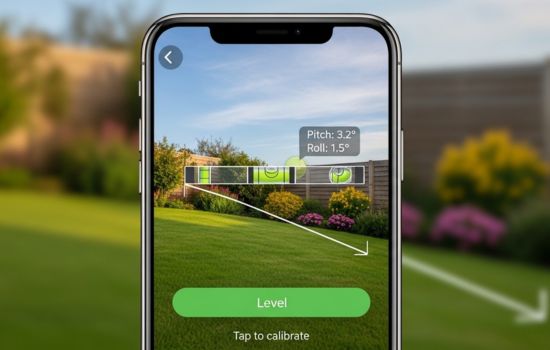
The camera component enhances functionality by providing visual reference points. Some advanced apps use augmented reality (AR) to overlay leveling information directly onto your camera view. This creates an intuitive experience where you can see exactly how level or unlevel a surface is in real-time.
Additionally, the magnetometer (compass) helps apps maintain accurate readings even when you rotate your device. This ensures consistent measurements regardless of which way you’re holding your phone.
🎯 Top Features to Look For in Leveling Apps
Not all leveling applications are created equal. The best ones incorporate specific features that enhance usability and accuracy for various projects.
Calibration Options
Professional-grade apps allow you to calibrate the sensors manually. This compensates for any manufacturing variations in your phone’s hardware and ensures maximum accuracy. Look for apps that guide you through a simple calibration process when you first launch them.
Multiple View Modes
Quality leveling apps offer different visualization modes. The bubble level view mimics traditional spirit levels, while camera overlay modes let you see the surface you’re measuring. Some apps even include a ruler mode for measuring distances and angles simultaneously.
Sound and Vibration Alerts
When you achieve a perfectly level surface, apps with audio and haptic feedback notify you instantly. This feature proves invaluable when you’re focusing on adjusting something and can’t constantly look at your screen.
Hold and Lock Functions
The ability to freeze measurements allows you to capture a reading and compare it with another surface. This becomes especially useful when matching slopes or ensuring multiple surfaces have identical angles.
Historical Data and Screenshots
Advanced applications store your measurements and allow you to take screenshots or export data. This documentation capability helps with project planning and quality assurance records.

🏗️ Practical Applications for Different Projects
Camera-based leveling apps serve countless purposes across various industries and DIY projects. Understanding where they excel helps you maximize their potential.
Construction and Landscaping
Before breaking ground on any construction project, verifying land levelness prevents costly mistakes. Contractors use these apps to check foundation sites, drainage slopes, and grading requirements. The camera feature helps visualize how water will flow across a property.
Landscapers rely on leveling apps when installing patios, decks, and retaining walls. Proper slope calculation ensures water drains away from structures, preventing erosion and water damage.
Home Improvement Tasks
Hanging pictures, mirrors, and shelves becomes effortless with a leveling app. The camera overlay shows exactly how straight your installation is before you commit with nails or screws. This eliminates the frustration of crooked frames and the wall damage from multiple attempts.
Kitchen and bathroom renovations demand precise leveling for cabinets and countertops. A smartphone app helps DIYers achieve professional results without investing in expensive tools.
Furniture and Appliance Installation
Washing machines, refrigerators, and dryers function best when perfectly level. Unbalanced appliances wear out faster and operate less efficiently. A quick check with your phone ensures optimal performance and longevity.
Pool tables, arcade games, and other recreational equipment require exact leveling for proper operation. Phone apps provide the precision needed for these demanding applications.
Photography and Videography
Professionals and hobbyists use leveling apps to ensure cameras are perfectly horizontal. This eliminates tilted horizons in landscape photography and creates more stable video footage. The camera-through-camera feature makes alignment intuitive and quick.
🔍 Accuracy Comparison: Apps vs Traditional Tools
Many people wonder whether smartphone apps can truly replace traditional leveling instruments. The answer depends on your specific needs and the quality of the app.
Standard bubble levels typically offer accuracy within 0.5 degrees. High-quality smartphone leveling apps achieve similar or better precision, often within 0.1 to 0.2 degrees. This makes them suitable for most residential and light commercial applications.
Professional laser levels remain superior for long-distance measurements and outdoor construction projects. However, for indoor work and shorter distances, smartphone apps provide comparable results at a fraction of the cost.
The convenience factor tilts heavily in favor of phone apps. You always have your smartphone with you, while traditional tools require remembering to bring them, storing them properly, and maintaining their calibration.
| Tool Type | Accuracy | Cost | Convenience | Best Use Cases |
|---|---|---|---|---|
| Smartphone App | ±0.1-0.2° | Free-$10 | Always available | Indoor projects, quick checks |
| Bubble Level | ±0.5° | $10-$50 | Must carry | General construction |
| Digital Level | ±0.1° | $50-$200 | Specialized tool | Precision work |
| Laser Level | ±0.05° | $100-$1000+ | Bulky equipment | Professional construction |
✅ Tips for Getting the Most Accurate Readings
While leveling apps are incredibly accurate, following best practices ensures you get reliable measurements every time.
Calibrate Before Important Projects
Take a minute to run through the calibration process before starting critical work. Place your phone on a known level surface and adjust the settings accordingly. Some apps calibrate automatically, but manual verification adds extra confidence.
Remove Phone Cases When Possible
Thick protective cases can interfere with sensor readings or prevent your phone from sitting flat against surfaces. For maximum accuracy, temporarily remove bulky cases during measurements.
Clean Your Camera Lens
When using camera overlay features, a smudged lens creates unclear visuals that make alignment difficult. A quick wipe with a microfiber cloth ensures crystal-clear readings.
Use Multiple Reference Points
Don’t rely on a single measurement. Check several points across the surface you’re leveling. This reveals subtle variations that might otherwise go unnoticed.
Avoid Moving While Measuring
Keep your phone and the surface being measured as still as possible. Movement during measurement creates fluctuating readings that reduce accuracy.
Consider Lighting Conditions
When using camera-based features, proper lighting helps you see surface details more clearly. Natural light or bright LED lighting works best for accurate visual assessment.
🌟 Understanding Sensor Limitations
While smartphone sensors are impressive, knowing their limitations helps you use leveling apps more effectively and understand when traditional tools might be necessary.
Temperature extremes affect sensor accuracy. Very cold or hot conditions can cause temporary drift in readings. Allow your phone to acclimate to ambient temperature before taking critical measurements.
Magnetic interference from metal structures, electrical equipment, or electronic devices can skew magnetometer readings. When working near these sources, rely more heavily on accelerometer-based measurements rather than compass functions.
Battery level can influence sensor performance on some devices. Phones in power-saving mode may reduce sensor sampling rates to conserve energy. For best results, ensure your phone has adequate charge before important measuring tasks.
Screen size limitations mean smaller phones display less information than larger devices. If you frequently use leveling apps professionally, consider this factor when choosing your next smartphone.
💡 Creative Uses Beyond Basic Leveling
Innovative users have discovered applications for leveling apps that extend far beyond traditional construction uses.
Vehicle Maintenance
Car enthusiasts use leveling apps to ensure vehicles sit level when adjusting suspension systems. This proves essential for proper alignment and tire wear patterns. The apps also help when parking campers and RVs, ensuring occupants sleep comfortably.
Art Installation
Gallery owners and museum curators rely on precision leveling when hanging valuable artwork. The camera overlay feature allows perfect alignment before drilling into walls, preserving both the art and the exhibition space.
Gaming Setup Optimization
Competitive gamers use leveling apps to ensure monitors and desks provide the most ergonomic viewing angles. Even slight tilts can cause eye strain during extended gaming sessions.
Furniture Making
Woodworkers check table saws, router tables, and workbenches for level surfaces. Precision in tool setup directly translates to quality in finished products.
Solar Panel Installation
DIY solar enthusiasts use leveling apps to optimize panel angles for maximum sun exposure. Proper tilt significantly impacts energy production efficiency throughout the year.
🔧 Troubleshooting Common Issues
Even the best apps occasionally present challenges. Knowing how to address common problems keeps your projects moving smoothly.
Inconsistent Readings
If measurements jump around erratically, first try recalibrating the app. Close other running applications that might interfere with sensor access. Restart your phone if problems persist, as this clears temporary software glitches.
App Crashes or Freezes
Outdated software causes stability issues. Check for app updates in your device’s app store. Also ensure your phone’s operating system is current, as newer apps require recent OS versions.
Camera Overlay Not Working
Verify that you’ve granted the app camera permissions in your phone’s settings. Some security settings block camera access by default. Navigate to your privacy settings and enable camera usage for the leveling app.
Measurements Don’t Match Physical Level
If your smartphone readings differ significantly from a traditional bubble level, the phone may need recalibration. Also check that your physical level is accurate—older bubble levels can develop air bubbles that affect their precision.
🚀 Future Developments in Leveling Technology
The evolution of smartphone sensors and software continues to enhance leveling app capabilities. Understanding emerging trends helps you anticipate even more powerful tools.
Artificial intelligence integration will enable apps to automatically suggest corrections when surfaces are unlevel. Machine learning algorithms will analyze patterns in your measurements and provide project-specific recommendations.
Augmented reality improvements will create more immersive experiences. Future apps might project 3D grids onto surfaces, showing exactly where adjustments are needed across entire floors or walls simultaneously.
Cloud connectivity will allow teams to share measurements in real-time. Contractors at different locations can access the same leveling data, coordinating efforts seamlessly across large projects.
Enhanced sensor fusion will combine data from multiple smartphones. By placing several devices across a large surface, apps could create comprehensive topographical maps showing every variation in level across an entire property.
🎓 Learning Resources and Community Support
Maximizing your leveling app’s potential becomes easier when you tap into available educational resources and user communities.
YouTube hosts countless tutorials demonstrating specific techniques for various projects. Search for your exact application—whether it’s deck building, tile installation, or appliance leveling—and you’ll find step-by-step guidance.
Reddit communities focused on construction, woodworking, and home improvement actively discuss leveling app experiences. Users share tips, compare apps, and troubleshoot issues collectively.
Many app developers maintain active support forums where users can ask questions directly. These resources often include detailed FAQs addressing common concerns.
Home improvement stores occasionally offer workshops on modern construction techniques, including smartphone tool usage. These hands-on learning opportunities provide practical experience under expert guidance.
🏆 Making the Right Choice for Your Needs
Selecting the perfect leveling app depends on your specific requirements, skill level, and project types. Consider what features matter most for your typical tasks.
Casual users who occasionally hang pictures or adjust furniture benefit from simple, free apps with basic functionality. These stripped-down versions eliminate learning curves and provide quick, reliable results.
Serious DIY enthusiasts should invest in premium apps offering advanced features like data export, multiple measurement modes, and detailed calibration options. The modest cost pays dividends in versatility and precision.
Professional contractors need apps that can withstand daily use and provide documentation for quality assurance. Look for options with project management integration and report generation capabilities.
Your smartphone itself plays a role in app performance. Newer devices with more advanced sensors deliver better accuracy and smoother operation. However, even mid-range phones from recent years provide adequate performance for most leveling tasks.
📊 Real-World Success Stories
Countless people have transformed their projects using smartphone leveling apps. These real experiences demonstrate the practical value these tools provide.
A weekend warrior successfully installed a 30-foot deck using only a smartphone app for leveling. The project passed professional inspection without any corrections needed. The homeowner saved hundreds of dollars on tool purchases while achieving professional-grade results.
A small landscaping company equipped their entire crew with leveling apps instead of purchasing multiple expensive laser levels. This decision reduced equipment costs while improving efficiency. Workers could quickly check grades and slopes without waiting for shared tools.
An artist opening her first gallery used a leveling app to hang an entire exhibition in a single afternoon. The precision allowed perfect alignment of dozens of pieces, creating a polished professional appearance that impressed critics and visitors alike.
A tiny house builder documented his entire construction process using leveling app screenshots. This visual proof of proper technique helped him secure permits and satisfied building inspectors who appreciated the thorough documentation.
🌍 Environmental and Economic Benefits
Choosing smartphone apps over traditional tools carries advantages beyond convenience and accuracy. The environmental and economic impacts deserve consideration.
Manufacturing physical leveling tools requires raw materials, energy, and transportation. Choosing digital alternatives reduces your environmental footprint. One smartphone replaces dozens of specialized tools, significantly decreasing resource consumption.
The economic accessibility of leveling apps democratizes construction knowledge. People in developing regions can access professional-grade tools without significant financial barriers. This empowerment enables better building practices worldwide.
Reduced tool clutter in homes and workshops creates more usable space. Instead of dedicating storage areas to rarely-used equipment, you access everything through a single device you already own and carry daily.
The learning curve for digital tools is often gentler than for traditional equipment. Interactive interfaces guide users through proper technique, reducing mistakes and material waste on projects.
✨ Embracing Technology in Traditional Trades
The integration of smartphone technology into construction and DIY work represents a broader shift in how we approach manual trades. This evolution enhances rather than replaces traditional skills.
Experienced craftspeople appreciate how digital tools verify their expert judgment. The apps confirm what skilled workers already sense, providing documentation and confidence. This combination of experience and technology produces exceptional results.
Younger workers entering construction trades find digital tools familiar and intuitive. This comfort with technology attracts new talent to industries facing workforce shortages. The blend of modern tech and timeless craftsmanship creates exciting career opportunities.
Educational institutions teaching construction trades increasingly incorporate smartphone tools into curricula. Students learn both traditional techniques and digital enhancements, preparing them for modern job sites where both skills matter.
The barrier between professional and amateur work continues to lower as powerful tools become universally accessible. This democratization doesn’t diminish professional expertise—instead, it elevates everyone’s baseline capability, raising quality standards across all projects.
Smartphone leveling apps represent a perfect example of how technology enhances practical work without complicating it. By transforming devices you already own into precision instruments, these applications make quality craftsmanship accessible to everyone. Whether you’re a professional contractor or a weekend DIYer, the camera-based leveling tools in your pocket deliver accuracy, convenience, and reliability that traditional equipment can rarely match at any price.
