
In today’s connected world, controlling your television through a smartphone app has become not just a convenience, but an essential part of the modern entertainment experience.


Gone are the days when losing your TV remote meant frantically searching under couch cushions or settling for manual button controls. With the rise of smart home technology, apps for controlling your television have revolutionized how we interact with our entertainment systems. These applications transform your smartphone into a powerful remote control, offering features that often surpass traditional remotes.
Whether you’ve misplaced your original remote, want to consolidate multiple devices into one control center, or simply prefer the convenience of using your phone, TV control apps provide elegant solutions. Let’s explore everything you need to know about these innovative applications and how they can enhance your viewing experience.
📱 Why Use an App to Control Your TV?
The transition from physical remotes to smartphone applications represents more than just technological progress—it’s about creating a seamless, integrated entertainment ecosystem. Modern TV control apps offer several compelling advantages that make them increasingly popular among users worldwide.
First and foremost, your smartphone is almost always within reach. While traditional remotes seem to vanish into thin air, your phone rarely leaves your side. This constant accessibility means you’ll never again interrupt your favorite show searching for the remote. Additionally, smartphone apps provide touchscreen interfaces that are often more intuitive than physical button layouts, especially for complex functions like navigating streaming services or adjusting advanced picture settings.
Another significant benefit is the consolidation of multiple remotes into a single device. If you have a TV, soundbar, streaming box, and cable receiver, you might be juggling four different remotes. A comprehensive control app can replace all of them, simplifying your entertainment setup dramatically.
🔧 How TV Control Apps Actually Work
Understanding the technology behind these apps helps you choose the right solution for your needs. TV control applications typically use one of three connection methods: infrared (IR), Wi-Fi, or Bluetooth.
Infrared technology mirrors traditional remote controls. Many smartphones, particularly Android devices, include built-in IR blasters that emit the same signals as physical remotes. Apps utilizing this technology can control virtually any TV with an IR receiver, regardless of whether it’s a smart TV or an older model. The main limitation is that you need a direct line of sight between your phone and the TV.
Wi-Fi connectivity offers the most robust control experience. When your smartphone and smart TV are connected to the same wireless network, apps can communicate bidirectionally with your television. This enables advanced features like voice search, keyboard input, content casting, and even viewing what’s currently playing on your TV screen through your phone. Wi-Fi control works from anywhere in your home without requiring line of sight.
Bluetooth provides a middle ground, offering wireless connectivity with lower power consumption than Wi-Fi. Some modern TVs support Bluetooth remote functionality, allowing seamless pairing with your smartphone for basic control functions.
🌟 Key Features to Look For
Not all TV control apps are created equal. When selecting an application, certain features distinguish exceptional solutions from basic remote replacements.
Universal compatibility stands as perhaps the most critical feature. The best apps support multiple brands and models, functioning as true universal remotes. This versatility proves invaluable if you have different TV brands in various rooms or when you upgrade your television without changing control apps.
Customizable interfaces allow you to personalize your control experience. Look for apps that let you rearrange buttons, create macros for common actions, or design custom layouts for different activities like watching movies, playing games, or listening to music.
Keyboard functionality transforms text input on your TV. Anyone who’s tried typing with directional arrows knows the frustration. Apps with virtual keyboards make searching for content, entering passwords, or browsing the web through your TV dramatically easier.
Voice control integration represents the cutting edge of TV interaction. Many premium apps incorporate voice recognition, allowing you to search for shows, change channels, or adjust settings using natural language commands.

🎯 Setting Up Your TV Control App
Getting started with a TV control app is typically straightforward, though the exact process varies depending on your connection method and TV model.
For Wi-Fi based control, begin by ensuring both your smartphone and TV are connected to the same wireless network. Download your chosen control app, then launch it. Most apps will automatically scan your network for compatible devices. When your TV appears in the list, select it and follow any on-screen pairing instructions. Some TVs display a PIN code that you’ll need to enter in the app to establish the connection.
If you’re using an app with IR functionality, the setup is even simpler. After installing the app, select your TV brand from the provided list. The app will typically test different IR codes until it finds the one that works with your specific model. This process usually takes less than a minute.
For Bluetooth connections, enable Bluetooth on both devices, put your TV in pairing mode (usually through the settings menu), and select it from your phone’s Bluetooth device list or within the app itself.
💡 Troubleshooting Common Issues
Even the best TV control apps occasionally encounter hiccups. Knowing how to resolve common problems ensures you’re never stuck without control over your television.
If your app can’t find your TV over Wi-Fi, first verify that both devices are on the same network. Many homes have separate 2.4GHz and 5GHz networks—your TV might be on one while your phone connects to the other. Additionally, some router security settings block device-to-device communication. Check your router’s settings for options labeled “AP Isolation” or “Client Isolation” and disable them if necessary.
When IR control stops working, ensure nothing is obstructing the path between your phone and TV. Also verify that your phone’s IR blaster is actually functioning—you can test this by pointing it at a camera (even your phone’s front camera using a mirror) and pressing buttons. You should see a faint light if the IR blaster is working.
Lag or delayed responses often indicate network congestion. Try closing other apps on your phone, moving closer to your Wi-Fi router, or restarting both your TV and router. If problems persist, updating your TV’s firmware and the app itself often resolves compatibility issues.
🏆 Benefits Beyond Basic Control
Modern TV control apps extend far beyond simply changing channels and adjusting volume. They unlock capabilities that enhance your entire entertainment experience in unexpected ways.
Screen mirroring and casting features let you share content from your phone directly to your TV. Whether you want to show photos from a recent vacation, present a work document, or enjoy mobile games on the big screen, integrated casting makes it effortless.
Smart home integration allows your TV control to interact with other connected devices. Imagine dimming your smart lights automatically when you start a movie or having your TV turn off when your smart security system activates away mode. These automations create a truly intelligent living space.
Multi-room control becomes possible when you have compatible TVs throughout your home. A single app can manage different televisions in various rooms, letting you start a show in the living room and continue it in the bedroom without missing a beat.
Content recommendations tailored to your viewing habits help you discover new shows and movies. Some apps analyze what you watch and suggest similar content, functioning as a personalized entertainment assistant.
🔒 Privacy and Security Considerations
While TV control apps offer tremendous convenience, it’s important to consider the privacy and security implications of connecting your devices.
Always download apps from official sources like the Google Play Store or Apple App Store. Third-party apps from unknown sources might contain malware or harvest your personal data. Check app permissions carefully—a TV remote app has no legitimate reason to access your contacts, location history, or camera.
When connecting via Wi-Fi, ensure your home network uses strong WPA3 or at minimum WPA2 encryption with a complex password. An unsecured network allows anyone within range to potentially access your devices, including control over your TV.
Be cautious with apps that require account creation. While some legitimate apps offer cloud-based features that necessitate accounts, others collect unnecessary personal information. Read privacy policies and reviews to understand how your data will be used.
📊 Comparing Connection Methods
Each connection technology offers distinct advantages and limitations. Understanding these differences helps you choose the right app for your specific situation.
Infrared excels in simplicity and universal compatibility. It works with virtually any TV, regardless of age or smart capabilities. However, it requires line of sight and doesn’t support advanced features like screen sharing. IR is ideal for controlling older TVs or as a backup option when Wi-Fi isn’t available.
Wi-Fi provides the richest feature set and most flexible control. It works from anywhere in your home, supports bidirectional communication, and enables advanced functions like casting and voice control. The tradeoffs include higher battery consumption and the requirement that your TV be a smart model with network connectivity.
Bluetooth offers a compromise between IR and Wi-Fi. It doesn’t require line of sight, consumes less battery than Wi-Fi, and provides moderate range. However, fewer TVs support Bluetooth control compared to the other methods, and available features typically fall between IR and Wi-Fi in terms of sophistication.
🎮 Special Use Cases and Scenarios
TV control apps shine in specific situations where traditional remotes fall short or become impractical.
For individuals with visual impairments, smartphone apps offer accessibility features like voice commands, haptic feedback, and screen reader compatibility that physical remotes cannot match. Large, customizable buttons on touchscreens can also benefit users with limited dexterity.
In commercial environments like hotels, restaurants, or waiting rooms, control apps allow staff to manage multiple TVs from a single device without needing to store and maintain numerous physical remotes. This centralization improves efficiency and reduces replacement costs.
Parents appreciate parental control features that some apps provide, allowing them to restrict certain channels, set viewing time limits, or monitor what content their children access—all from their smartphones without interrupting the viewing experience.
For tech enthusiasts with complex home theater setups, advanced apps support macro programming. A single button press can execute multiple commands: turn on the TV, switch to the correct input, start the sound system, adjust lighting, and begin playback.
🚀 Future Trends in TV Control Technology
The evolution of TV control apps continues to accelerate, with emerging technologies promising even more seamless integration between our devices and entertainment systems.
Artificial intelligence integration will enable apps to learn your viewing habits and preferences, automatically adjusting picture settings based on content type, suggesting shows at times you typically watch TV, or even queuing up episodes of series you’re following without manual input.
Gesture control through smartphone cameras represents an emerging frontier. Some experimental apps can interpret hand movements captured by your phone’s camera and translate them into TV commands, creating a touchless control experience.
Cross-platform synchronization will allow you to start watching content on your TV, continue on your tablet during your commute, and finish on your phone—all controlled and coordinated through unified apps that track your progress across devices.
Enhanced smart home ecosystems will make your TV an even more integral part of your connected home, with control apps serving as hubs that manage not just entertainment but lighting, climate, security, and more through intuitive, unified interfaces.
✨ Making the Most of Your TV Control App
To truly maximize the value of your TV control application, consider these practical tips and best practices.
Explore all available features rather than using your app as just a basic remote replacement. Many users never discover advanced capabilities like screen mirroring, custom button layouts, or automation features that could significantly enhance their experience.
Keep your app updated to ensure compatibility with the latest TV firmware and access to new features. Developers regularly improve functionality, fix bugs, and add support for additional TV models through updates.
Consider setting up multiple profiles if your app supports them. Different family members can have personalized control layouts, favorite channel lists, and customized settings that automatically load when they use the app.
Take advantage of widget functionality if available. Adding a TV control widget to your smartphone’s home screen provides instant access to essential functions like power, volume, and mute without opening the full app.
Experiment with voice commands if your app includes this feature. Voice control might feel awkward initially, but it often becomes the fastest way to search for content or navigate menus once you’re comfortable with it.
🎬 The Bottom Line on TV Control Apps
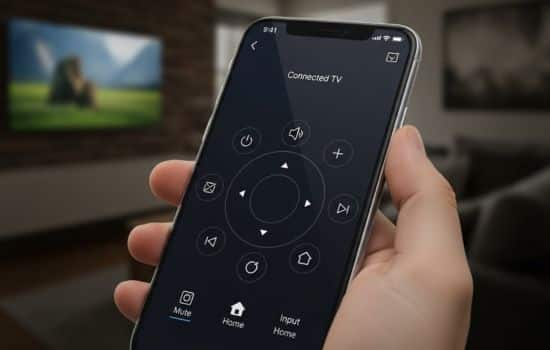
Transforming your smartphone into a sophisticated TV remote represents one of the simplest yet most impactful smart home upgrades you can make. With minimal setup and often at no cost, these apps eliminate the frustration of lost remotes while unlocking features that traditional clickers simply cannot provide.
Whether you’re drawn to the convenience of always having a remote in your pocket, the advanced functionality of keyboard input and voice control, or the ability to manage your entire home entertainment system from one device, TV control apps deliver tangible benefits that enhance your daily viewing experience.
As smart home technology continues to evolve, the line between your smartphone and home entertainment system will blur even further. TV control apps stand at the forefront of this convergence, offering a glimpse into a future where all our devices work together seamlessly to create personalized, intuitive experiences.
The investment required is minimal—usually just a few minutes to download and configure an app—but the convenience and capabilities you gain can transform how you interact with your television. In a world where we’re constantly seeking ways to simplify and streamline our daily routines, TV control apps represent a small change that makes a surprisingly big difference.
