
Video editing apps have revolutionized how we create, share, and consume visual content in today’s fast-paced digital world.
Gone are the days when professional video editing required expensive desktop software and years of technical training. Today’s mobile applications put powerful editing tools directly into your hands, enabling anyone with a smartphone to craft stunning visual stories. Whether you’re a content creator building your brand, a business owner marketing products, or simply someone who loves capturing life’s moments, video editing apps have become essential companions in our creative journeys.
The explosion of social media platforms like TikTok, Instagram Reels, and YouTube Shorts has fueled unprecedented demand for quick, professional-looking video content. This shift has sparked innovation in mobile editing technology, resulting in apps that rival traditional desktop software in capability while maintaining user-friendly interfaces. Let’s explore everything you need to know about choosing and using the perfect video editing app for your needs. 🎬
Why Mobile Video Editing Has Become Essential
The smartphone revolution fundamentally changed content creation. With high-quality cameras built into nearly every phone, we’re all potential filmmakers. Video editing apps bridge the gap between raw footage and polished content that captures attention and tells compelling stories.


Mobile editing offers unmatched convenience. You can shoot, edit, and publish content from a single device, anywhere and anytime. This workflow efficiency has made it possible for creators to maintain consistent posting schedules without being tethered to a computer. The immediacy of mobile editing means you can capture trending moments and share them while they’re still relevant.
Additionally, many video editing apps now incorporate artificial intelligence features that automate complex tasks. Auto-captions, background removal, color correction, and beat-syncing capabilities that once required professional expertise are now accessible through simple taps and swipes. This democratization of video production has opened creative possibilities to millions worldwide.
Key Features to Look For in a Video Editing App
Not all video editing applications are created equal. Understanding which features matter most for your specific needs will help you choose the right tool and avoid overwhelming yourself with unnecessary complexity.
Intuitive User Interface and Timeline Editing
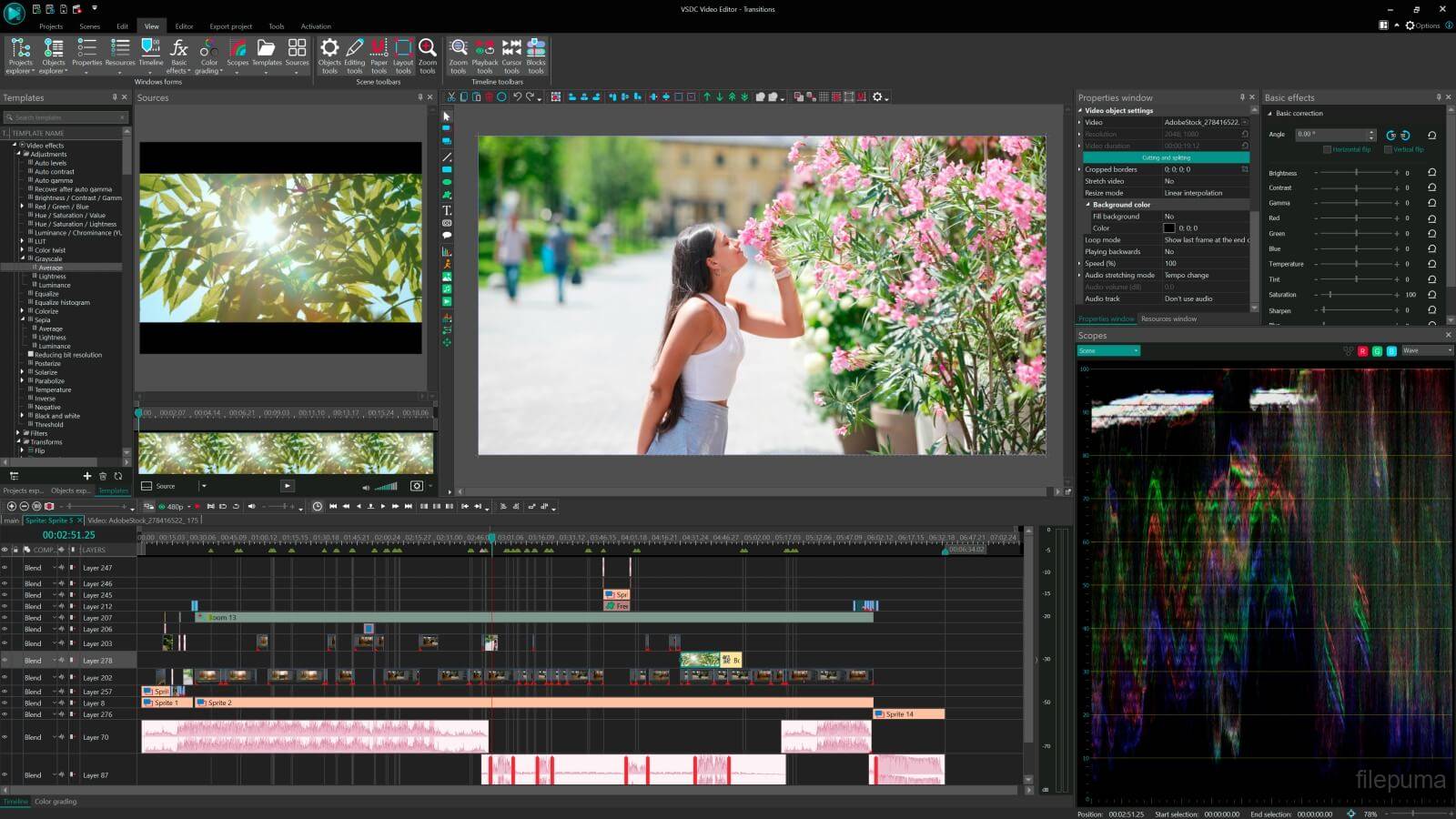
A clean, intuitive interface makes the difference between frustration and creative flow. Look for apps with drag-and-drop functionality, clearly labeled tools, and timeline editors that let you precisely trim, split, and arrange clips. The best apps balance powerful features with accessibility, ensuring you spend time creating rather than searching for tools.
Multi-layer timeline support has become increasingly important. This feature allows you to stack video clips, images, text, stickers, and effects on separate layers, giving you precise control over how elements interact. Professional-grade apps offer dozens of layers, while beginner-friendly options typically provide enough layers for most projects. ✨
Comprehensive Effects and Transitions Library
Effects and transitions add polish and personality to your videos. Quality editing apps offer extensive libraries including:
- Smooth transitions between clips (fades, wipes, zooms, and creative effects)
- Color filters and grading presets for establishing mood and aesthetic consistency
- Text animations and title templates for professional-looking introductions
- Stickers, emojis, and graphic elements for adding visual interest
- Speed controls for slow motion and time-lapse effects
- Green screen (chroma key) capabilities for background replacement
The best apps regularly update their effect libraries with trending styles, keeping your content fresh and current with platform-specific trends.
Audio Editing Capabilities
Great video content requires excellent audio. Modern video editing apps include robust audio features such as background music libraries with licensed tracks, voiceover recording capabilities, sound effect collections, and audio mixing controls to balance multiple audio sources. Advanced apps offer noise reduction, audio ducking (automatically lowering background music when dialogue occurs), and beat detection for syncing cuts to music rhythm.
Some applications even provide auto-caption generation using speech recognition technology, making your content more accessible while improving engagement rates. This feature has become particularly valuable as many viewers watch videos without sound in public spaces or during work breaks.
Top Features That Elevate Your Video Content
Beyond basic editing, certain advanced features can significantly enhance your video quality and creative possibilities. Understanding these capabilities helps you push your content to the next level.
AI-Powered Editing Tools 🤖
Artificial intelligence has transformed video editing from a technical skill into an intuitive creative process. AI features now include automatic video creation from photos, smart object tracking for adding effects that follow subjects, background removal without green screens, and auto-reframing that intelligently crops videos for different aspect ratios.
These intelligent tools analyze your footage and make sophisticated editing decisions in seconds that would traditionally take hours. While purists might prefer manual control, AI assistance dramatically speeds up workflow and helps beginners achieve professional results immediately.
Export Quality and Format Options
Your finished video is only as good as its export quality. Premium editing apps offer flexible export settings including resolution options from 720p to 4K and beyond, frame rate control (24fps for cinematic looks, 30fps for standard, 60fps for smooth action), and aspect ratio presets for different platforms (16:9 for YouTube, 9:16 for Stories, 1:1 for Instagram feed).
Look for apps that allow bitrate adjustment to balance file size with quality, and hardware acceleration that uses your phone’s GPU for faster rendering. The difference between a 10-minute export and a 2-minute export can significantly impact your productivity and posting consistency.
Understanding Free vs. Paid Video Editing Apps
The app marketplace offers both free and paid options, each with distinct advantages. Making the right choice depends on your budget, needs, and long-term content goals.
Free apps typically provide core editing features but may include watermarks on exported videos, limited effect libraries, lower export resolutions, or ads within the interface. These limitations encourage upgrades to paid versions but still allow beginners to learn and experiment without financial commitment.
Paid apps or subscriptions unlock premium features including watermark removal, full-resolution exports (often up to 4K), complete access to effects, transitions, and music libraries, regular content updates, priority customer support, and cloud storage for projects. Many apps offer free trials, letting you test premium features before committing financially.
Consider your usage frequency when deciding. Casual editors creating occasional personal videos may find free versions perfectly adequate. Content creators posting regularly across multiple platforms will likely benefit from investing in premium versions that streamline workflow and remove limitations. 💰
Optimizing Your Workflow for Faster Video Creation
Efficiency separates hobbyists from consistent creators. Developing a streamlined workflow allows you to produce more content without sacrificing quality or burning out.
Pre-Production Planning
Great videos begin before you open your editing app. Plan your shots, create simple storyboards or shot lists, organize footage into folders before importing, and write scripts or bullet points for narration. This preparation reduces editing time dramatically by ensuring you capture exactly what you need.
Template Creation and Reuse
Most editing apps allow you to save custom presets, templates, and favorite effects. Create templates for recurring content types like intros, outros, lower thirds, and transition sequences. This consistency not only speeds up production but also strengthens your brand identity across content.
Keyboard Shortcuts and Gestures
Learning your app’s shortcuts and gestures might seem tedious initially, but this knowledge pays dividends over time. Simple actions like pinch-to-zoom on timelines, double-tap to split clips, and swipe gestures for quick deletions save seconds that accumulate into hours across dozens of projects.
Creating Platform-Specific Content
Different social platforms have unique requirements and audience expectations. Smart creators optimize content for each destination rather than posting identical videos everywhere.
For Instagram Reels and TikTok, prioritize vertical 9:16 format, hook viewers within the first 3 seconds, use trending audio and effects, keep videos under 60 seconds for maximum engagement, and include text overlays since many watch without sound.
YouTube content typically benefits from horizontal 16:9 format, longer-form content (8-15 minutes often performs well), strong thumbnails and titles (create these in your editing app), and chapter markers for longer videos to improve viewer retention.
Facebook and LinkedIn audiences often prefer authentic, value-driven content with less emphasis on trendy effects. Square (1:1) format works well in feeds, while native captions significantly boost engagement since autoplay defaults to muted.
Common Video Editing Mistakes to Avoid
Even experienced creators fall into common traps that diminish video quality. Awareness of these pitfalls helps you sidestep them entirely.
Over-editing ranks among the most frequent mistakes. Adding every available transition, effect, and sticker creates visual chaos rather than compelling content. Restraint and intentionality make stronger creative statements than excessive embellishment. Let your story guide editing choices rather than showcasing every tool available. 🎨
Poor audio quality instantly marks content as amateur. Background noise, inconsistent volume levels, and music that overwhelms dialogue all detract from your message. Always edit with headphones to catch audio issues, and use your app’s audio tools to clean up and balance sound.
Ignoring aspect ratios for different platforms wastes your frame composition. Videos shot horizontally and cropped to vertical often cut out important elements. Plan your shoots with final platform in mind, or use apps with intelligent reframing to optimize composition automatically.
Inconsistent pacing loses viewer attention. Videos that drag through unnecessary footage or jump frantically between shots without establishing rhythm feel uncomfortable. Watch your edits with fresh eyes, trimming ruthlessly and ensuring each shot serves a purpose.
Advanced Techniques for Professional Results
Once you’ve mastered basics, experimenting with advanced techniques elevates your content above typical amateur productions.
Color Grading for Mood and Aesthetics
Color grading transforms the emotional impact of footage. Learning to adjust highlights, shadows, saturation, and temperature gives you cinematic control. Many apps offer LUTs (Look-Up Tables) – preset color grades that instantly apply professional film looks to your footage. Experiment with creating signature color styles that make your content immediately recognizable.
Dynamic Text and Typography
Text isn’t just for titles anymore. Animated text that emphasizes key points, kinetic typography that moves with your narration, and creative text placement that guides viewer attention all add production value. Choose fonts that match your content’s tone and ensure text remains readable on mobile screens.
Motion Graphics and Animation
Simple animations – moving shapes, animated logos, or sliding elements – add professional polish. Many mobile apps now include keyframe animation tools that let you control element movement, scale, rotation, and opacity over time. Start simple with basic movements before attempting complex animations.
Staying Current with Video Trends
Video content trends evolve rapidly. What worked brilliantly six months ago might feel dated today. Staying informed keeps your content fresh and relevant.
Follow platform creator accounts and trend newsletters that highlight emerging styles. Analyze successful content in your niche, noting editing techniques, pacing, and effects. Experiment regularly with new features your editing app introduces – early adoption of new effects can give you visibility advantages.
However, balance trend participation with authentic expression. Jumping on every trend feels desperate and dilutes your unique voice. Choose trends that align with your content strategy and audience interests, adapting them to fit your style rather than copying them exactly. 🌟
Building Your Editing Skill Over Time
Professional-level editing doesn’t happen overnight. It develops through consistent practice, experimentation, and learning from both successes and mistakes.
Set aside dedicated time for learning, not just creating content. Watch tutorials specific to your chosen app, study videos you admire and attempt to recreate techniques you see, and join online communities where creators share tips and provide feedback.
Challenge yourself with project-based learning. Create videos outside your comfort zone – if you typically make talking-head content, try a fully visual story. If you rely heavily on effects, create something powerful through pure cuts and pacing. These exercises expand your creative toolkit.
Document your progress by occasionally rewatching older content. You’ll notice improvements you didn’t realize you’d made, which motivates continued growth. This reflection also helps identify persistent weaknesses you can target with focused practice.
Monetization Opportunities Through Video Content
Quality video editing skills open numerous revenue streams beyond traditional employment. Understanding these opportunities can transform hobby into income.
Platform monetization through ad revenue, creator funds, and tipping features provides direct income from your content. Meeting platform requirements for monetization should be a goal if you’re posting consistently.
Sponsored content and brand partnerships often pay significantly more than ad revenue. As your audience grows, brands may pay you to feature products. Your editing skills ensure these partnerships feel natural rather than forced advertisements.
Freelance editing services let you monetize skills without building a personal audience. Small businesses, other creators, and marketing agencies constantly need quality editors. Starting with competitive rates on freelance platforms can build a client base and portfolio.
Digital products like preset packs, templates, and online courses allow you to package your expertise and sell it repeatedly. Once created, these products generate passive income while helping others improve their editing.
The Future of Mobile Video Editing
Mobile editing technology continues advancing at remarkable speed. Understanding emerging trends helps you prepare for what’s next.
Artificial intelligence will become even more sophisticated, potentially offering features like automatic story assembly from raw footage, predictive editing that suggests cuts based on content analysis, and voice-command editing for hands-free workflow. These advances won’t replace human creativity but will handle technical grunt work more efficiently.
Cloud-based editing increasingly allows seamless work across devices. Start a project on your phone during your commute, continue on a tablet at lunch, and finish on your computer at home – all syncing automatically. This flexibility removes device limitations from creative processes.
Real-time collaboration features will expand, letting multiple creators work on single projects simultaneously from different locations. This capability, common in document editing, will revolutionize video production workflows for teams.
Augmented reality integration will blur lines between editing and effects, allowing real-time AR element addition during shooting rather than post-production. This shift could fundamentally change how we approach video creation. 🚀
Making Your Final App Choice
With countless options available, choosing the right video editing app requires honest assessment of your needs, skill level, and goals.
Beginners should prioritize user-friendly interfaces with good tutorials over feature quantity. Starting with a simple app builds confidence and fundamental skills. You can always graduate to more complex tools later.
Intermediate editors benefit from apps balancing accessibility with advanced features – tools that grow with your skills rather than limiting or overwhelming you. Look for active user communities where you can ask questions and find inspiration.
Professional creators need reliability, speed, and comprehensive feature sets. Premium subscriptions typically make sense at this level since removed limitations and time savings justify costs through improved productivity and content quality.
Download several highly-rated options and test them with actual projects rather than just exploring interfaces. Real-world use quickly reveals which app matches your workflow and thinking style. Many creators use multiple apps, leveraging each tool’s strengths for different project types.
Remember that the best video editing app is simply the one you’ll actually use consistently. A feature-rich application that confuses or frustrates you delivers less value than a simpler tool that makes editing enjoyable. Your enthusiasm and consistency matter more than any specific feature set. The creative stories you tell and value you provide audiences transcend technical specifications – they come from your unique perspective and voice, amplified by whatever editing tools help you express them most effectively. 🎥
