

In today’s hyper-connected world, knowing your internet speed isn’t just helpful—it’s essential for optimizing your digital experience and troubleshooting connectivity issues effectively.
Whether you’re streaming your favorite shows, attending video conferences, or gaming online, your internet speed directly impacts these experiences. An internet speed test app provides instant insights into your connection’s performance, helping you understand what’s really happening behind the scenes of your digital life.
These convenient mobile tools have revolutionized how we monitor network performance. Gone are the days of wondering why a video buffers endlessly or why a file upload takes forever. With just a few taps, you can diagnose connection problems and make informed decisions about your internet service. 🚀
Why Internet Speed Testing Matters More Than Ever
The pandemic fundamentally changed how we use the internet. Remote work, virtual learning, and digital entertainment have become staples of daily life. This shift makes reliable internet connectivity not just convenient but absolutely critical for productivity and quality of life.


Internet speed test applications serve multiple purposes beyond simple curiosity. They help you verify whether your Internet Service Provider (ISP) is delivering the speeds you’re paying for. If you’re subscribed to a 100 Mbps plan but consistently measure significantly lower speeds, you have concrete evidence to present when contacting customer service.
These apps also assist in identifying network congestion patterns throughout the day. You might discover that your connection performs wonderfully at 6 AM but struggles during evening hours when neighborhood usage peaks. This knowledge empowers you to schedule bandwidth-intensive tasks strategically.
For professionals working from home, speed testing apps become diagnostic tools. Before an important video conference, a quick test can confirm your connection is stable enough to support high-quality video streaming without embarrassing freezes or disconnections. 💼
Understanding the Key Metrics: Download, Upload, and Ping
Internet speed test apps measure three primary metrics, each revealing different aspects of your connection’s performance. Understanding these numbers helps you interpret results meaningfully rather than just seeing random figures.
Download Speed: The Gateway to Content Consumption
Download speed measures how quickly data travels from the internet to your device. This metric matters most when streaming videos, browsing websites, downloading files, or receiving emails. It’s measured in megabits per second (Mbps), and higher numbers indicate faster performance.
For context, Netflix recommends at least 5 Mbps for HD streaming and 25 Mbps for Ultra HD content. If your download speed falls below these thresholds, you’ll experience buffering and quality degradation during streaming sessions.
Upload Speed: Your Digital Output Channel
Upload speed indicates how quickly data travels from your device to the internet. This becomes crucial when video conferencing, uploading files to cloud storage, posting content on social media, or live streaming. Upload speeds are typically slower than download speeds on residential connections.
Video conferencing platforms like Zoom recommend at least 3 Mbps upload speed for HD video quality. Content creators and professionals who frequently share large files need substantially higher upload speeds to work efficiently. 📤
Ping and Latency: The Responsiveness Factor
Ping measures latency—the time it takes for a small data packet to travel from your device to a server and back. Measured in milliseconds (ms), lower ping values indicate more responsive connections. This metric is particularly important for online gaming, video calls, and real-time applications.
A ping below 20ms is excellent, 20-50ms is good, 50-100ms is acceptable for most activities, and anything above 100ms may cause noticeable delays in interactive applications. Gamers especially prioritize low ping to avoid lag that can affect competitive performance.
How Internet Speed Test Apps Actually Work
Behind the simple interface of a speed test app lies sophisticated technology that accurately measures your connection’s capabilities. Understanding this process helps you trust and properly interpret the results you receive.
When you initiate a test, the app first identifies the nearest test server to minimize variables caused by geographical distance. It then downloads a small file to measure how quickly data arrives at your device, calculating your download speed based on the file size and transfer time.
For upload testing, the process reverses—the app sends data to the server and measures how long the transfer takes. The ping test sends tiny data packets and measures the round-trip time. Modern apps perform these tests simultaneously or in rapid succession to provide comprehensive results within seconds.
Most quality apps run multiple tests and average the results to account for momentary fluctuations in network performance. This methodology provides more reliable measurements than a single snapshot test. 📊
Choosing the Right Internet Speed Test App for Your Needs
The app stores overflow with speed testing options, each offering different features and interfaces. Selecting the right one depends on your specific requirements and how you plan to use the collected data.
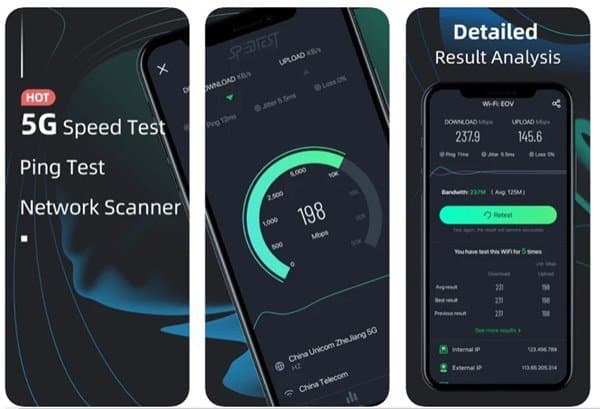
Popular options include FAST Speed Test by Netflix, which focuses on simplicity and measures the speed specifically for streaming services. Ookla’s Speedtest app offers comprehensive features including detailed history tracking, server selection, and comparison tools. Other alternatives provide specialized features like VPN-enabled testing or network diagnostics.
Consider these factors when choosing an app:
- Accuracy and reliability: Look for apps with proven track records and positive user reviews regarding measurement precision
- Interface design: A clean, intuitive interface makes regular testing more convenient and results easier to understand
- Historical data: Apps that save your test history let you track performance trends over time
- Ad experience: Some free apps include intrusive advertising that may affect the testing process itself
- Additional features: Network diagnostics, WiFi signal strength meters, and connection troubleshooting tools add value
- Privacy considerations: Review what data the app collects and how it’s used or shared
Best Practices for Accurate Speed Testing
Simply tapping the test button doesn’t guarantee accurate results. Following proper testing procedures ensures measurements truly reflect your connection’s capabilities rather than temporary conditions or testing errors.
Optimize Your Testing Environment
For the most accurate WiFi measurements, position yourself close to your router. Physical distance and obstacles like walls significantly impact wireless signal strength and speed. If testing your maximum connection capability, consider connecting directly via ethernet cable to eliminate WiFi as a variable.
Close background applications that might be using bandwidth during the test. Streaming services, cloud backups, software updates, and other devices sharing your connection can all affect results. Pausing these activities temporarily provides a clearer picture of your available speed. ✅
Test at Different Times
Network performance fluctuates throughout the day based on overall usage patterns in your area. Testing only during off-peak hours might give you an overly optimistic view, while testing exclusively during peak times could be unnecessarily pessimistic.
Conduct tests at various times—morning, afternoon, evening, and late night—over several days. This comprehensive approach reveals patterns and helps you understand when your connection performs best and when it struggles under load.
Run Multiple Tests
A single test provides just one data point. Network conditions can vary moment to moment due to temporary congestion, server availability, or interference. Running three to five consecutive tests and comparing the results gives you a more reliable average and helps identify anomalies.
Interpreting Results and Taking Action
Collecting speed test data is only valuable if you understand what the numbers mean and what actions you should take based on those findings. Different scenarios call for different responses.
If your measured speeds consistently fall significantly below your subscribed plan (more than 20% lower), document multiple test results taken at different times and contact your ISP. They may identify line issues, equipment problems, or service disruptions affecting your connection.
When speeds are adequate but you still experience performance issues, the problem might lie elsewhere. Outdated routers, interference from neighboring networks, too many connected devices, or device-specific problems could be the culprits rather than your actual internet speed. 🔍
Conversely, if your speeds exceed your needs but you’re paying for a premium tier, you might consider downgrading your plan to save money. Many households oversubscribe to internet services they don’t fully utilize based on misconceptions about required speeds.
The Impact of WiFi on Speed Test Results
Your WiFi network often becomes the bottleneck between your device and the internet, even when your ISP delivers excellent speeds to your modem. Understanding WiFi limitations helps you accurately interpret speed test results.
Older routers supporting only the 802.11n WiFi standard max out around 300 Mbps under ideal conditions, with real-world performance often much lower. If you subscribe to gigabit internet service but use an outdated router, you’ll never see those speeds wirelessly.
WiFi signal strength degrades with distance and obstacles. Metal objects, thick walls, aquariums, and even neighboring WiFi networks create interference that reduces both speed and stability. The 5 GHz WiFi band offers faster speeds but shorter range, while 2.4 GHz provides better coverage at lower speeds.
Testing your connection both via WiFi and with a direct ethernet connection reveals whether your wireless network is limiting your speeds. This information guides whether you need a better router, mesh WiFi system, or strategic router placement to optimize performance. 📡
Mobile Data vs. Home Broadband Speed Testing
Internet speed test apps serve equally important purposes for both home broadband and mobile cellular connections, though the contexts and expectations differ significantly.
Mobile data speeds vary dramatically based on your location, network congestion, signal strength, and carrier infrastructure. Testing your 4G or 5G connection helps you understand what to expect in different locations and whether you’re experiencing normal service or technical issues.
Mobile carriers often implement data throttling after you exceed certain usage thresholds. Regular speed testing can reveal if your carrier has reduced your connection speed due to hitting data caps, which might influence how you manage your data consumption.
For home broadband, expectations center on consistency and reliability. You’re paying for a specific speed tier and expect relatively stable performance. Mobile data, however, inherently fluctuates based on tower proximity, user density, and whether you’re indoors or outdoors.
Privacy and Data Considerations with Speed Test Apps
While speed test apps provide valuable services, it’s worth considering what information they collect and how they use it. Like most applications, these tools gather various types of data during operation.
At minimum, speed test apps collect your IP address, approximate location, ISP information, device type, and of course your speed test results. Some apps aggregate this data to create global internet performance maps and statistics, while others may use it for targeted advertising purposes.
Review the privacy policy of any speed test app before installation. Look for clear explanations of what data is collected, how it’s stored, whether it’s shared with third parties, and whether you can opt out of certain data collection practices. Apps from reputable companies generally handle data more responsibly than unknown developers. 🔐
If privacy is a paramount concern, consider apps from companies with strong privacy commitments or those that explicitly minimize data collection. Some apps operate without requiring accounts or storing historical data, providing a more privacy-conscious alternative.
Troubleshooting Common Internet Speed Issues
Speed test apps excel at identifying problems, but they don’t automatically fix them. Understanding common causes of slow internet helps you take corrective action based on your test results.
Router placement significantly affects WiFi performance. Routers buried in closets, positioned in corners, or surrounded by electronic equipment struggle to distribute signals effectively. Central, elevated locations away from major obstacles provide optimal coverage.
Outdated firmware on your router can cause performance degradation and security vulnerabilities. Check your router manufacturer’s website for firmware updates and install them regularly to maintain optimal performance and security.
Too many connected devices competing for bandwidth can slow your entire network. Smart home devices, smartphones, tablets, computers, gaming consoles, and streaming devices all consume bandwidth. Consider upgrading your internet plan if your household has grown more connected over time.
Sometimes the issue lies with your ISP’s infrastructure rather than your home equipment. Service outages, maintenance work, or localized technical problems affect connection quality. Speed test apps help distinguish between problems you can fix and issues requiring ISP intervention. ⚙️
The Future of Internet Speed Testing Technology
As internet technology evolves, so too do the tools we use to measure and understand our connections. Emerging trends point toward more sophisticated, automated, and integrated speed testing capabilities.
Artificial intelligence integration will enable apps to not just measure speed but predict problems before they impact your experience. Machine learning algorithms could analyze historical patterns and alert you to degrading performance that might indicate impending equipment failure or service issues.
Integration with smart home ecosystems might automate speed testing, continuously monitoring your connection in the background and alerting you only when problems arise. This passive monitoring approach eliminates the need for manual testing while providing comprehensive performance data.
As 5G networks mature and eventually give way to 6G technology, speed testing apps will adapt to measure increasingly faster connections and more complex network characteristics. The metrics that matter may expand beyond simple download, upload, and ping to include more nuanced performance indicators.
The growing importance of internet connectivity in daily life ensures that speed testing tools will continue evolving, becoming more sophisticated while remaining accessible to non-technical users who simply want their internet to work reliably. 🌐
Making Internet Speed Testing Part of Your Digital Routine
Rather than testing your connection only when problems arise, incorporating regular speed checks into your routine provides valuable baseline data and early problem detection. This proactive approach helps you maintain optimal connectivity.
Consider testing weekly or monthly when everything seems normal. These baseline measurements establish what your connection typically achieves, making it easier to recognize when performance degrades. Documenting normal performance also strengthens your position if you need to dispute service quality with your ISP.
Schedule tests before important virtual events. Running a quick speed test before a critical video interview, online exam, or important presentation confirms your connection can handle the bandwidth requirements without surprises.
Use speed test results to inform decisions about internet plans, equipment upgrades, and household usage patterns. Data-driven decisions about your internet service ensure you’re neither overpaying for unused capacity nor suffering from inadequate speeds for your actual needs.
In our increasingly connected world, internet speed test apps have evolved from novelty tools into essential utilities for managing our digital lives. These simple yet powerful applications demystify internet connectivity, providing transparency about service quality and empowering users to optimize their online experiences. Whether you’re troubleshooting frustrating slowdowns, verifying service delivery, or simply satisfying curiosity about your connection’s capabilities, having a reliable speed test app readily available on your smartphone makes managing your digital infrastructure easier and more effective. ✨
