
Pinterest has revolutionized the way we discover, save, and organize visual content online, becoming the ultimate platform for creative inspiration and lifestyle planning.


Whether you’re planning a wedding, redecorating your living room, searching for the perfect recipe, or simply exploring new fashion trends, Pinterest serves as your personal visual search engine. With over 450 million active users worldwide, this platform has transformed from a simple bookmarking tool into a comprehensive lifestyle companion that sparks creativity and helps turn dreams into reality.
The beauty of Pinterest lies in its simplicity and visual appeal. Unlike traditional social media platforms focused on social networking, Pinterest prioritizes content discovery and personal curation. It’s a space where inspiration meets organization, allowing users to create virtual mood boards that reflect their interests, aspirations, and projects.
📌 What Makes Pinterest Different from Other Social Platforms
Pinterest stands apart from conventional social media networks in several fundamental ways. While platforms like Instagram and Facebook emphasize social connections and real-time sharing, Pinterest functions primarily as a visual discovery engine. Users come to Pinterest with intent—they’re actively searching for ideas, solutions, and inspiration rather than passively scrolling through friends’ updates.
The platform’s algorithm is designed to understand your preferences and serve increasingly relevant content based on your interactions. Every Pin you save, board you create, and search you conduct helps Pinterest refine its recommendations. This creates a personalized experience that becomes more valuable over time, unlike the often overwhelming and unpredictable feeds of other social networks.
Another distinguishing feature is Pinterest’s evergreen content nature. A Pin created years ago can still drive traffic and engagement today if it contains valuable information. This contrasts sharply with platforms where content loses visibility within hours or days of posting. For creators and businesses, this means their efforts have lasting value and potential for continuous discovery.
🎨 How to Get Started with Pinterest: A Beginner’s Guide
Creating your Pinterest account takes just minutes, whether you choose to sign up with your email, Google account, or Facebook credentials. Once registered, Pinterest immediately asks about your interests to personalize your home feed. Be honest and selective during this onboarding process—the topics you choose will shape your initial experience and recommendations.
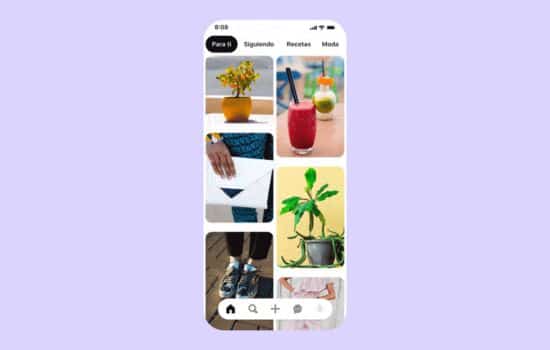
After setup, you’ll encounter the home feed, a curated collection of Pins based on your stated interests. Don’t worry if it’s not perfect immediately; Pinterest learns from your behavior. Start by exploring different categories and Pins that catch your eye. When you find something appealing, click on it to view details, visit the original source, or save it to one of your boards.
Boards are the organizational backbone of Pinterest. Think of them as digital folders or scrapbooks where you collect related ideas. You might create boards for “Kitchen Renovation Ideas,” “Healthy Recipes,” “Travel Destinations,” or “Business Card Designs”—whatever reflects your interests and projects. Boards can be public for others to discover or kept secret for personal planning.
Creating Your First Boards
When creating a board, choose descriptive names that clearly indicate the content type. Instead of vague titles like “Stuff I Like,” opt for specific names like “Minimalist Bedroom Inspiration” or “Mediterranean Diet Recipes.” This specificity helps both you and other users understand the board’s purpose at a glance.
Add a brief description to each board explaining what you’re collecting and why. These descriptions serve dual purposes: they help you stay focused when adding Pins, and they improve your boards’ discoverability in Pinterest searches. Include relevant keywords naturally within these descriptions without stuffing them artificially.
🔍 Mastering Pinterest Search and Discovery
Pinterest’s search functionality goes far beyond simple keyword matching. The visual search feature allows you to take or upload photos and find similar images, products, or ideas. This proves incredibly useful when you spot something inspiring in real life but don’t know what it’s called or where to find it.
When you perform a text search, Pinterest offers guided search suggestions below the search bar. These suggestions help narrow your results and discover related concepts you might not have considered. For example, searching “living room decor” might surface suggestions like “living room decor modern,” “living room decor apartment,” or “living room decor on a budget.”
The Explore tab presents trending topics and popular content across various categories. This section is perfect for breaking out of your usual patterns and discovering new interests. Pinterest regularly updates these featured collections, ensuring fresh inspiration is always available regardless of how frequently you visit the platform.

💡 Creative Ways to Use Pinterest in Daily Life
Pinterest’s applications extend far beyond casual browsing. Many users leverage the platform as a powerful planning tool for major life events. Wedding planning represents one of Pinterest’s most popular use cases, with millions of boards dedicated to venue ideas, dress styles, floral arrangements, and reception themes. The platform allows couples to collaboratively plan by sharing boards and gathering input from friends and family.
Home renovation and interior design projects benefit enormously from Pinterest’s visual organization capabilities. Instead of bookmarking dozens of websites or saving random photos to your camera roll, you can create specific boards for each room or project phase. This centralized collection makes it easy to identify patterns in your preferences and share your vision with contractors, designers, or roommates.
Professional development and career planning have found a home on Pinterest as well. Users create boards for resume templates, interview outfit ideas, office organization systems, and productivity tips. Entrepreneurs and freelancers collect branding inspiration, marketing strategies, and business card designs. The platform serves as a visual library of professional resources accessible anywhere, anytime.
Pinterest for Meal Planning and Recipes
Food represents one of Pinterest’s most popular and practical categories. Home cooks create boards for meal prep ideas, special diet recipes, holiday menus, and baking projects. The platform’s recipe Pins often include ingredients lists, cooking times, and user ratings, making them more functional than simple food photography.
Many users organize their recipe boards by meal type, cuisine style, or dietary restriction. This organization transforms Pinterest into a personalized digital cookbook that grows with your culinary adventures. When meal planning for the week, you can quickly browse your saved recipes and create shopping lists based on the dishes that appeal to you.
🛍️ Shopping and Product Discovery Through Pinterest
Pinterest has evolved into a significant shopping platform, with millions of users discovering and purchasing products directly through the app. Shop-able Pins display current pricing, availability, and direct purchase links, streamlining the path from inspiration to acquisition. This integration makes Pinterest particularly valuable for fashion, home decor, and gift shopping.
The platform’s visual nature makes it ideal for exploring product variations and alternatives. When you find a piece of furniture or clothing item you like, Pinterest can surface similar options at different price points or from various retailers. This comparison shopping happens organically as you browse, without requiring separate searches or opening multiple browser tabs.
Retailers and brands have embraced Pinterest as a crucial marketing channel, creating rich product catalogs and styled content that appears in users’ feeds and search results. For consumers, this means access to curated collections and styling ideas that go beyond traditional product listings, showing how items look in real-life contexts.
📱 Pinterest Mobile App Features and Functionality
The Pinterest mobile app delivers the platform’s full functionality with mobile-specific enhancements. The camera feature allows instant visual searches—point your camera at any object, and Pinterest will identify it and find similar items or related ideas. This augmented reality capability transforms any moment into a potential discovery opportunity.
Push notifications keep you informed about new Pins added to boards you follow, trending topics in your interest areas, and updates from Pinterest creators you’ve subscribed to. These notifications are customizable, allowing you to control the frequency and types of alerts you receive to avoid overwhelming your device.
The app’s offline functionality enables you to view previously loaded Pins even without an internet connection. This feature proves valuable when traveling, commuting through areas with poor reception, or wanting to conserve mobile data. Pins you’ve recently viewed remain accessible, allowing uninterrupted browsing of your saved inspiration.
Organizing Pins with Sections and Notes
Within individual boards, you can create sections to further organize your Pins. For example, a “Dream Kitchen” board might include sections for appliances, countertop materials, backsplash ideas, and lighting fixtures. This additional layer of organization prevents boards from becoming cluttered catch-alls and makes finding specific saved content effortless.
The notes feature allows you to add personal comments to saved Pins, capturing why you saved them or important details to remember. These notes remain private and searchable within your account, creating a personalized annotation system that enhances the value of your collections over time.
👥 Social Features and Community Engagement
While Pinterest prioritizes content over social networking, it still offers community features that enhance the experience. Following other users whose aesthetic and interests align with yours fills your home feed with curated content from people with similar tastes. This human curation often surfaces hidden gems that algorithms alone might miss.
Collaborative boards enable multiple users to contribute Pins to a shared collection. These work beautifully for group projects, event planning, or shared interest groups. A family might create a collaborative board for vacation destination ideas, while colleagues could collaborate on a board for office design inspiration.
Commenting on Pins facilitates conversation and information exchange. Users often comment to ask questions about sources, share experiences with products or projects, or offer alternative ideas and suggestions. These interactions build a supportive community atmosphere where people help each other bring their creative visions to life.
🎯 Pinterest for Business and Content Creators
Pinterest offers robust business tools for brands, entrepreneurs, and content creators seeking to reach engaged audiences. A business account provides access to analytics showing which Pins perform best, audience demographics, and trending searches in your niche. These insights inform content strategy and help optimize visual content for maximum impact.
Rich Pins automatically sync information from your website to your Pins, ensuring details like pricing, availability, and article headlines stay current. Different Rich Pin types exist for products, recipes, articles, and apps, each displaying relevant metadata that improves user experience and conversion rates.
Pinterest advertising allows precise targeting based on interests, keywords, demographics, and behaviors. The platform’s high-intent audience often delivers better conversion rates than other social networks because users are actively seeking solutions and ideas rather than passively scrolling. Promoted Pins blend seamlessly into organic content, maintaining aesthetic appeal while reaching broader audiences.
🔐 Privacy Settings and Account Management
Pinterest provides granular privacy controls allowing users to customize their experience and visibility. You can make your entire profile private, limiting visibility to only those you approve, or keep your profile public while making specific boards secret. Secret boards remain completely hidden from others, perfect for surprise party planning, confidential projects, or personal collections.
The platform allows you to control who can send you messages, whether your account appears in search engine results, and if Pinterest can use your activity to personalize ads. Taking time to review these settings ensures your Pinterest experience aligns with your comfort level regarding privacy and discoverability.
Account management features include the ability to download your data, understanding exactly what information Pinterest has collected. You can also deactivate or permanently delete your account if you decide to leave the platform, with clear instructions provided for both processes.
✨ Tips for Getting the Most Value from Pinterest
Consistency improves your Pinterest experience significantly. Regular engagement teaches the algorithm your preferences, resulting in increasingly relevant recommendations. Even spending just 10-15 minutes daily browsing, saving, and organizing Pins yields better personalized results than sporadic marathon sessions.
Use descriptive board names and include keywords that help you find boards quickly as your collection grows. When you have dozens of boards, clear naming conventions become essential for efficient navigation. Consider organizing boards into a logical hierarchy that mirrors how you think about different life areas or projects.
Don’t hesitate to clean up your boards periodically. As your tastes evolve and projects complete, some saved Pins lose relevance. Archiving or deleting outdated content keeps your collections fresh and useful. Pinterest allows bulk Pin management, making it easy to reorganize or remove multiple items simultaneously.
Engage with the wider Pinterest community by following users whose style resonates with you, commenting thoughtfully on Pins, and trying new searches outside your usual patterns. This active participation expands your creative horizons and often leads to discovering unexpected interests and ideas that enrich your experience beyond your initial intentions.
🌟 The Future of Visual Discovery
Pinterest continues evolving with new features and capabilities that enhance visual discovery and creativity. Recent additions like Pinterest TV introduce live and recorded video content, expanding beyond static images to more dynamic inspiration formats. Creator tools provide ways for influencers and educators to build followings and share expertise through the platform.
Artificial intelligence and machine learning improvements make visual search increasingly accurate and contextually aware. Pinterest can now identify specific elements within images—like a particular chair in a room photo—and surface shopping options or similar design ideas. This granular recognition transforms the platform into an ever-more-powerful tool for translating inspiration into action.
As augmented reality technology advances, Pinterest is positioned to offer immersive preview experiences. Imagine visualizing furniture in your actual room before purchasing, or trying on makeup looks virtually through the Pinterest lens. These emerging capabilities promise to bridge the gap between digital inspiration and physical reality more seamlessly than ever before.
Pinterest has established itself as an indispensable tool for anyone seeking inspiration, organization, and creative fulfillment in the digital age. Its unique focus on visual discovery rather than social networking creates a refreshingly positive online space where users actively pursue their passions and bring ideas to life. Whether you’re planning a major life event, exploring new hobbies, or simply daydreaming about possibilities, Pinterest offers an endless well of inspiration waiting to be discovered. 🌈
