
In today’s digital age, our smartphones have become powerful tools that can replace many traditional devices, including the classic measuring tape.


Whether you’re a professional contractor, an interior designer, or simply someone who occasionally needs to measure furniture dimensions, having a measuring tool readily available on your phone can be incredibly convenient. Gone are the days when you had to carry bulky measuring tapes or rush to the hardware store for a quick measurement.
The technology behind these applications leverages augmented reality (AR), camera sensors, and advanced algorithms to deliver surprisingly accurate measurements. What once seemed like science fiction is now a practical reality that fits right in your pocket. Let’s explore how these innovative apps work and which ones deliver the best results. 📱
How Smartphone Measuring Apps Actually Work
Modern measuring applications utilize several sophisticated technologies to transform your device into a functional measuring tool. The primary method involves augmented reality combined with your phone’s camera and motion sensors.
When you open a measuring app, it uses your camera to detect surfaces and depth perception through a technology called ARKit (for iOS devices) or ARCore (for Android). These frameworks analyze the environment in real-time, identifying horizontal and vertical planes like floors, walls, and tabletops.
The gyroscope and accelerometer in your phone provide crucial data about the device’s orientation and movement. As you move your phone through space, the app calculates distances based on these sensor readings combined with visual data from the camera.
Some apps also use the time-of-flight (ToF) sensors found in newer smartphones, which emit infrared light and measure how long it takes to bounce back from objects. This provides even more accurate depth information.
Top Features to Look for in Measuring Apps 🔍
Not all measuring applications are created equal. When selecting the right tool for your needs, consider these essential features that separate exceptional apps from mediocre ones.
Measurement accuracy stands as the most critical factor. The best apps typically achieve accuracy within 1-2% for distances up to 10 feet, though this can vary based on your device’s capabilities and lighting conditions.
Multiple measurement modes add versatility to your toolkit. Look for apps that offer point-to-point measurements, height detection, area calculation, and volume estimation. Some advanced applications even provide angle measurements and level functionality.
Photo capture with annotations allows you to save measurements directly on images. This feature proves invaluable when planning home improvements or shopping for furniture, as you can reference exact dimensions later.
Unit conversion options ensure compatibility regardless of your preferred measurement system. The ability to switch seamlessly between inches, feet, centimeters, and meters makes these apps useful internationally.
History and project management features help organize multiple measurements. Professional users especially benefit from apps that let them create projects, add notes, and export data.

Practical Applications in Everyday Life
The versatility of smartphone measuring apps extends far beyond simple DIY projects. These digital tools have found their way into numerous aspects of daily life, proving surprisingly useful in unexpected situations.
Home Improvement and Interior Design 🏠
Planning a room makeover becomes significantly easier when you can instantly measure spaces without fishing around for a tape measure. Before purchasing new furniture, quickly check if that couch will fit through your doorway or if the dining table will leave enough walking space.
Interior designers use these apps during client consultations to document room dimensions, window sizes, and ceiling heights. The ability to capture photos with embedded measurements creates a comprehensive visual reference for future planning.
Shopping Made Smarter
Ever stood in a furniture store wondering if that beautiful bookshelf would fit in your living room? With a measuring app already loaded with your home’s dimensions, you can make confident purchasing decisions on the spot.
Online shopping benefits equally. When product descriptions provide dimensions, you can visualize exactly how items will fit in your space before clicking “buy now.” This reduces returns and disappointment significantly.
Professional Construction and Real Estate
While professional-grade laser measures remain the standard for critical construction work, smartphone measuring apps serve perfectly for quick estimations, preliminary measurements, and client presentations.
Real estate agents use these tools during property showings to provide instant room dimensions to interested buyers. Contractors can quickly estimate material quantities for quotes without carrying additional equipment.
Maximizing Accuracy: Tips and Best Practices ✨
While smartphone measuring apps offer remarkable convenience, achieving optimal accuracy requires understanding their limitations and following proper techniques.
Lighting conditions matter tremendously. AR technology relies heavily on visual data, so adequate lighting helps the app detect surfaces more accurately. Avoid measuring in dim rooms or bright sunlight that creates harsh shadows and glare.
Start with calibration. Many apps include calibration features that fine-tune measurements to your specific device. Spend a few minutes comparing app measurements against a physical tape measure and adjust settings accordingly.
Keep movements slow and steady. Rapid phone movements confuse the sensors and reduce accuracy. When taking measurements, move your device smoothly and deliberately, giving the app time to process visual information.
Measure against clearly defined reference points. Apps perform best when measuring between distinct edges or corners. Vague or rounded surfaces can confuse the detection algorithms.
Consider multiple measurements. Just as you might measure twice with a physical tape, taking several readings and averaging them improves reliability, especially for critical dimensions.
Comparing Different Types of Measuring Apps
The market offers various categories of measuring applications, each with distinct approaches and capabilities. Understanding these differences helps you choose the right tool for your specific needs.
AR-Based Measuring Apps
These applications represent the cutting edge of smartphone measurement technology. They overlay virtual measuring tools onto your camera’s live view, allowing you to measure real-world objects by simply pointing your phone.
AR apps excel at measuring larger objects and distances, typically handling anything from a few inches to several dozen feet. They work best on devices with dedicated AR capabilities like Apple’s newer iPhones or Android phones with ARCore support.
Photo-Based Measurement Tools
These apps analyze existing photos to extract dimensional information. You typically place an object of known size in the photo as a reference point, and the app calculates other dimensions relative to that reference.
While less convenient than real-time AR measurement, photo-based apps prove useful when measuring objects from images you’ve already captured or when dealing with hard-to-reach items.
On-Screen Ruler Applications
The simplest category displays a virtual ruler or tape measure directly on your phone’s screen. These work best for measuring small objects that you can place directly against your device.
Though limited in scope, on-screen rulers require no special sensors or AR capabilities, making them universally compatible with virtually any smartphone. They’re perfect for measuring small items like screws, jewelry, or craft materials.
Understanding Limitations and When to Use Traditional Tools ⚠️
Despite impressive technological advances, smartphone measuring apps aren’t appropriate for every situation. Recognizing their limitations ensures you use the right tool for each task.
Precision-critical applications still require traditional measuring instruments. If you’re cutting expensive materials, installing cabinetry, or doing any work where millimeter-level accuracy matters, invest in proper measuring tools.
Very small measurements below one inch often challenge smartphone apps. The camera’s resolution and AR tracking become less reliable at tiny scales. For detailed work like jewelry making or electronics, traditional measuring tools remain superior.
Outdoor measurements in bright sunlight can prove problematic. The phone’s screen becomes difficult to see, and intense light interferes with camera sensors and AR tracking. Professional laser distance meters handle these conditions better.
Legal or official documentation purposes require certified measuring equipment. Building permits, property surveys, and insurance claims need measurements from calibrated, approved instruments, not smartphone apps.
Enhancing Your Measurement Workflow 🛠️
Integrating measuring apps into a broader workflow maximizes their utility and helps overcome individual limitations. Smart workflows combine digital convenience with traditional accuracy where necessary.
Consider using measuring apps for preliminary surveys and planning, then confirming critical dimensions with traditional tools before making final decisions or cuts. This approach balances speed with accuracy.
Pair your measuring app with note-taking or project management applications. Many apps allow exports to other platforms where you can combine measurements with photos, sketches, and written notes into comprehensive project documentation.
Create a personal reference library by measuring common items in your home. Knowing the dimensions of doorways, hallways, and standard spaces helps when shopping or planning projects remotely.
The Future of Smartphone Measurement Technology
As smartphone hardware continues advancing, measuring applications will only become more capable and accurate. Several emerging technologies promise to revolutionize mobile measurement further.
LiDAR sensors, currently appearing in premium smartphones, use laser pulses to create detailed 3D maps of environments. This technology delivers professional-grade accuracy that rivals dedicated measuring devices.
Machine learning algorithms are becoming smarter at interpreting visual data, improving measurement accuracy even on older devices without specialized sensors. AI can compensate for sensor limitations through intelligent analysis.
Integration with augmented reality glasses and wearable devices will make hands-free measuring possible. Imagine walking through a space while your smart glasses automatically capture and record all dimensions.
Cloud-based collaboration features will enable teams to share measurements in real-time, with multiple users contributing to the same project simultaneously from different locations.
Privacy and Security Considerations 🔒
Like any app that uses your camera and sensors, measuring applications raise valid privacy questions. Understanding what data these apps collect and how they use it protects your personal information.
Most reputable measuring apps only process camera data locally on your device, never sending photos or video to external servers. However, always review permission requests and privacy policies before installation.
Be cautious about taking measurements in sensitive or private locations. Some apps save photos automatically, which could inadvertently capture information you’d prefer to keep confidential.
When using measuring apps professionally, ensure compliance with any relevant workplace policies regarding camera usage and data collection, especially in secure facilities or client locations.
Making the Most of Free vs. Premium Versions
Many measuring apps offer both free versions with basic functionality and premium tiers with advanced features. Deciding which option suits your needs depends on usage frequency and required capabilities.
Free versions typically include fundamental point-to-point measurements and basic unit conversions. For occasional home users who need simple measurements a few times per month, free versions often suffice perfectly.
Premium subscriptions usually unlock features like unlimited saved measurements, project organization, advanced measurement modes (angles, volumes, areas), export options, and ad-free experiences.
Before committing to a paid subscription, thoroughly test the free version. This ensures the app’s interface, accuracy, and general performance meet your expectations before investing money.
Consider that one-time purchase options often provide better long-term value than recurring subscriptions if you plan to use the app regularly over extended periods.
Transforming Your Phone into a Complete Toolbox 📦
Measuring apps represent just one category in a growing ecosystem of tool-replacement applications. Combined with other utility apps, your smartphone becomes a remarkably versatile digital toolbox.
Level and angle measurement apps use your phone’s accelerometer to function as a spirit level or protractor. These pair naturally with measuring apps for comprehensive spatial analysis.
Flashlight apps with adjustable brightness turn your phone into an inspection light for dark spaces. Material identifier apps help determine what you’re measuring, whether wood types, metals, or fabrics.
Calculator apps specialized for construction math handle measurements, area calculations, and material estimations. Together with measuring apps, they streamline project planning significantly.
Real User Experiences and Success Stories ⭐
Understanding how others successfully use measuring apps provides valuable insights and creative application ideas you might not have considered.
Home renovators frequently share stories about how measuring apps helped them avoid costly furniture purchasing mistakes. One user measured their entire apartment before visiting IKEA, resulting in a perfectly planned room layout on the first try.
Small business owners in delivery and moving services use these apps to quickly assess whether items will fit in vehicles or through doorways, improving customer service and operational efficiency.
DIY enthusiasts building custom furniture report using measuring apps during lumber yard visits to verify material dimensions before purchase, catching supplier errors that would have derailed projects.
Parents appreciate using measuring apps to track children’s growth with fun AR visualizations, creating memorable height charts without marking walls or doorframes.
Troubleshooting Common Issues
Even the best measuring apps occasionally encounter problems. Knowing how to troubleshoot common issues saves frustration and improves measurement success rates.
If measurements seem consistently inaccurate, recalibrate your app and ensure your phone’s camera lens is clean. Fingerprints and smudges significantly impact AR tracking quality.
When the app fails to detect surfaces, improve lighting conditions and ensure you’re measuring objects with clear, defined edges rather than transparent or highly reflective surfaces.
Battery drain during extended measuring sessions is normal since AR applications use multiple sensors simultaneously. Consider keeping a portable charger handy for intensive measurement projects.
App crashes or freezing typically indicate insufficient device memory. Close background applications and restart your phone before beginning measurement sessions.
Environmental Impact: The Digital Advantage 🌱
Beyond convenience, using smartphone measuring apps offers subtle environmental benefits compared to traditional measuring tools.
Digital tools eliminate the need to manufacture, package, and transport physical measuring devices, reducing material consumption and carbon emissions associated with production and distribution.
The longevity factor matters too. Physical tape measures wear out, break, and require replacement. Your smartphone measuring app continues working indefinitely through simple software updates.
Reduced paper waste occurs when measurements are stored digitally rather than written on notepads or blueprints that eventually get discarded. Digital documentation is searchable, shareable, and environmentally friendlier.
While smartphones themselves have environmental impacts, maximizing their utility by replacing multiple single-purpose tools represents more efficient resource use overall.
Wrapping Up: Your Pocket-Sized Measuring Solution
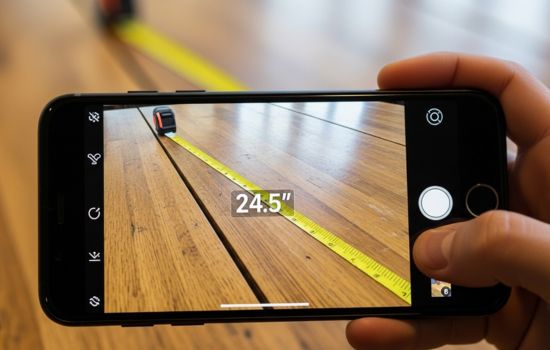
Smartphone measuring apps have evolved from novelty features into genuinely useful tools that deliver surprising accuracy and convenience. While they won’t completely replace professional measuring equipment for precision work, they serve brilliantly for everyday measurement needs.
The technology continues improving with each smartphone generation, bringing enhanced sensors, better cameras, and more sophisticated software. Today’s measuring apps represent the foundation for even more impressive capabilities arriving in coming years.
Whether you’re furnishing an apartment, planning home improvements, or simply curious about dimensions in your daily life, having a reliable measuring app installed transforms your phone into an always-ready tool. The best part? It’s already in your pocket, waiting to help with your next measurement challenge. 📏✨
