
Video editing has become an essential skill in the digital age, and choosing the right app can transform your creative vision into stunning visual content that captivates audiences.


Whether you’re a social media enthusiast, content creator, or aspiring filmmaker, mobile video editing applications have revolutionized how we produce and share visual stories.
These powerful tools put professional-grade editing capabilities right in your pocket, eliminating the need for expensive equipment or complex desktop software.
The accessibility and intuitive interfaces of modern video editing apps have democratized content creation, allowing anyone with a smartphone to craft compelling videos that rival professionally produced content.
Let’s explore everything you need to know about selecting and mastering the perfect video editing app for your creative needs.
🎬 Why Mobile Video Editing Apps Have Changed the Game
The transition from desktop-only editing to mobile-first creation represents one of the most significant shifts in digital media production. Today’s smartphones pack processing power that would have been unimaginable just a decade ago, enabling real-time effects, multi-layer editing, and instant sharing capabilities.
Mobile video editors have eliminated traditional barriers to entry in content creation. No longer do you need to invest thousands in software licenses or spend weeks learning complicated interfaces. Modern apps offer intuitive gesture-based controls, intelligent automation, and guided workflows that help beginners create polished videos within minutes of downloading.
The convenience factor cannot be overstated. You can capture footage, edit it, add effects, and publish directly to social platforms without ever transferring files to a computer. This streamlined workflow accelerates the creative process and allows creators to capitalize on trending topics while they’re still relevant.
🔑 Essential Features Every Quality Video Editor Should Include
When evaluating video editing applications, certain core features separate exceptional tools from mediocre ones. Understanding these capabilities helps you make informed decisions that align with your creative goals and technical requirements.
Timeline-Based Editing Interface
A robust timeline view gives you precise control over every element in your project. This feature allows you to arrange clips, adjust timing, layer multiple media types, and visualize your entire project structure at a glance. Apps with magnetic timelines that automatically snap elements together streamline the editing process significantly.
Multi-Layer Support
Professional-quality videos often require combining multiple video tracks, audio layers, text overlays, and graphic elements. The best editing apps support numerous simultaneous layers, giving you creative flexibility to build complex compositions without limitations.
Transition and Effect Libraries
Pre-built transitions help your footage flow smoothly from one scene to another, while effects add visual interest and professional polish. Look for apps offering customizable presets that you can modify to match your unique style rather than generic one-size-fits-all options.
Audio Editing Capabilities
Sound quality often determines whether viewers continue watching or click away. Essential audio features include volume adjustment, fade in/out controls, noise reduction, voiceover recording, and the ability to add background music with automatic beat synchronization.
Text and Title Tools
Captivating text overlays communicate information, emphasize key points, and enhance storytelling. Quality apps provide diverse fonts, animation options, customizable templates, and the ability to track text to moving objects within your footage.

📱 Optimizing Your Workflow for Mobile Editing Success
Mastering mobile video editing extends beyond learning individual features. Developing an efficient workflow maximizes your productivity and ensures consistent quality across all your projects.
Start by organizing your raw footage before opening your editing app. Create folders for different projects, delete unusable takes immediately, and rename files with descriptive labels. This preparation saves countless hours searching through disorganized media libraries during editing sessions.
Consider your video’s purpose and platform before making editing decisions. Instagram Reels require different aspect ratios and pacing than YouTube tutorials. TikTok videos benefit from rapid cuts and trending audio, while corporate presentations demand smoother transitions and professional aesthetics.
Establish a consistent editing routine that works for your creative process. Some creators prefer rough-cutting entire projects first, then refining with effects and audio. Others work section-by-section, perfecting each segment before moving forward. Experiment to discover what method keeps you motivated and productive.
🎨 Creative Techniques That Elevate Your Video Content
Technical proficiency with editing tools represents only half the equation. Understanding fundamental creative principles transforms good videos into memorable experiences that resonate with audiences.
The Power of Pacing and Rhythm
Controlling tempo keeps viewers engaged throughout your content. Action sequences benefit from quick cuts that maintain energy, while emotional moments require longer shots that allow feelings to develop. Syncing cuts to musical beats creates subconscious satisfaction that makes videos feel more polished.
Strategic Color Grading
Color correction ensures visual consistency across shots, while color grading establishes mood and atmosphere. Warm tones evoke comfort and nostalgia, cool palettes suggest professionalism or melancholy, and saturated colors grab attention in crowded social feeds. Most editing apps include preset filters, but customizing these presets yields more distinctive results.
Motion Graphics and Animations
Subtle movement draws attention to important elements without overwhelming viewers. Animated lower-thirds introduce speakers professionally, kinetic typography emphasizes key phrases, and smooth zoom effects highlight critical details. The key is restraint—excessive animation distracts from your message rather than enhancing it.
Layering Audio for Depth
Professional videos rarely rely on single audio tracks. Combining dialogue, ambient sound, music, and sound effects creates immersive experiences. Balance these elements carefully, ensuring voiceovers remain intelligible while background elements add richness without competition.
💡 Common Mistakes to Avoid When Editing on Mobile
Even experienced editors fall into traps when transitioning to mobile platforms. Recognizing these pitfalls helps you develop better habits from the beginning.
Over-editing ranks among the most frequent errors. Adding every available effect, transition, and filter creates chaotic videos that fatigue viewers. Professional content typically employs restraint, using effects purposefully rather than decoratively. When in doubt, simplicity usually wins.
Ignoring audio quality undermines otherwise excellent visuals. Viewers forgive imperfect video quality far more readily than poor audio. Always edit with headphones to catch issues like background noise, inconsistent levels, or awkward silence that smartphone speakers might mask.
Neglecting export settings wastes your editing efforts. Each platform has optimal specifications for resolution, aspect ratio, frame rate, and file format. Exporting in incorrect formats results in cropped compositions, reduced quality, or rejection during upload. Research target platform requirements before beginning your project.
Failing to save projects regularly risks losing hours of work to app crashes or device issues. Most modern apps auto-save, but manually saving at major milestones provides additional security. Consider backing up important projects to cloud storage for extra protection.
🚀 Advanced Features That Unlock Professional Possibilities
Once you’ve mastered fundamental editing techniques, exploring advanced features pushes your content into truly professional territory.
Keyframe Animation
Keyframing allows precise control over how properties change over time. You can animate position, scale, rotation, opacity, and various effects, creating custom movements impossible with preset animations. This technique enables picture-in-picture effects, custom transitions, and dynamic text animations.
Chroma Keying (Green Screen)
Green screen capabilities transport subjects to any location or environment. This technology once required expensive equipment but now works remarkably well on mobile devices. Proper lighting and a quality green background yield results indistinguishable from desktop-edited footage.
Speed Ramping
Gradually changing playback speed creates dramatic emphasis and smooth transitions between real-time and slow-motion footage. Speed ramping adds cinematic quality to action sequences, reveals, and transitions that abrupt speed changes cannot match.
Masking and Selective Editing
Masking tools let you apply effects to specific portions of your frame while leaving others unaffected. You might blur backgrounds while keeping subjects sharp, apply color grading to skies without affecting foregrounds, or create split-screen effects with different treatments on each side.
📊 Comparing Free vs. Premium Editing Apps
The debate between free and paid editing applications depends heavily on your specific needs, skill level, and content goals.
| Aspect | Free Apps | Premium Apps |
|---|---|---|
| Cost | No upfront investment | Subscription or one-time purchase |
| Watermarks | Often included on exports | Clean, branded exports |
| Features | Basic editing tools | Advanced capabilities and effects |
| Export Quality | May limit resolution | Full HD or 4K support |
| Asset Libraries | Limited music and effects | Extensive royalty-free resources |
| Support | Community forums | Direct customer service |
Free applications work perfectly for casual creators experimenting with video content or producing personal projects. They offer sufficient tools to learn fundamental editing principles without financial commitment.
Premium apps justify their cost for serious creators whose content generates income or brand value. Professional exports without watermarks, advanced features, and regular updates provide returns that far exceed subscription fees for active users.
🌟 Tips for Creating Platform-Specific Content
Different social platforms reward different content styles, and understanding these preferences helps your videos perform optimally.
Instagram and Facebook
These platforms prioritize stopping power in crowded feeds. Lead with your strongest visual within the first second, use captions for sound-off viewing, maintain 1:1 or 9:16 aspect ratios, and keep videos under 60 seconds for maximum engagement. Trending audio significantly boosts discoverability.
YouTube
Longer-form content thrives here with proper optimization. Create compelling thumbnails and titles, structure videos with clear chapters, maintain 16:9 aspect ratio, and include strong calls-to-action. Viewer retention metrics heavily influence recommendations, so pace content to minimize drop-off.
TikTok
Authenticity outperforms polish on this platform. Quick cuts, trending sounds, and participatory challenges drive engagement. Videos should hook viewers immediately and deliver value within 15-30 seconds. Vertical format is non-negotiable.
Professional tone and valuable insights resonate here. Keep videos under three minutes, add professional captions, use square or vertical formats, and focus on educational or inspirational content. Subtle branding appears more appropriate than aggressive promotion.
🔧 Troubleshooting Common Technical Challenges
Even the best editing apps occasionally present technical difficulties. Understanding solutions keeps your workflow moving smoothly.
If your app crashes frequently, check available storage space first. Video editing requires substantial temporary storage, and insufficient space causes instability. Close background apps, clear cache, and consider offloading completed projects to free resources.
Laggy playback during editing usually indicates your device is processing effects in real-time. Lower preview quality settings to improve responsiveness without affecting final export quality. Alternatively, render effects as you go rather than attempting to preview everything simultaneously.
Export failures often result from attempting to create files larger than your system supports. Try reducing resolution, shortening video length, or compressing with different codecs. Also verify you have sufficient storage for the final file.
Color inconsistencies between your editing preview and final export suggest color profile mismatches. Ensure your app and export settings use consistent color spaces, and calibrate your device screen if possible for more accurate color representation during editing.
📈 Measuring Success and Improving Your Skills
Continuous improvement separates hobbyists from accomplished creators. Developing analytical habits accelerates your skill development significantly.
Study your analytics to understand what resonates with audiences. Which videos retain viewers longest? What editing styles generate the most engagement? Where do viewers typically drop off? These insights inform future creative decisions based on evidence rather than assumptions.
Actively seek constructive feedback from peers and mentors. Join creator communities, participate in challenges, and engage with other editors. Fresh perspectives reveal blind spots and introduce techniques you might never discover independently.
Regularly challenge yourself with new techniques and styles. Recreate edits from videos you admire, experiment with unfamiliar features, and set constraints that force creative problem-solving. Growth occurs outside comfort zones.
Maintain a portfolio showcasing your best work and document your creative journey. Reviewing your progression over months and years provides motivation during plateaus and tangible evidence of skill development.
🎯 Making Your Final App Selection
Choosing the ideal video editing app requires honest assessment of your current skills, future goals, and practical constraints.
Begin by listing your must-have features based on the content you plan to create. A travel vlogger needs excellent stabilization and color grading, while a tutorial creator prioritizes screen recording and annotation tools. Your specific requirements should drive selection rather than marketing hype.
Download several candidates and test them with real projects before committing to premium versions. Most apps offer free trials or limited versions that reveal whether their interface and workflow match your preferences. Fifteen minutes of testing saves money and frustration.
Consider your device capabilities honestly. High-end apps with advanced features may run poorly on older smartphones, creating frustration rather than inspiration. Match app requirements with your hardware to ensure smooth performance.
Read recent reviews focusing on comments about updates, customer service, and reliability. Frequent updates suggest active development, while abandoned apps may stop functioning properly after system updates. Prioritize apps with strong developer support and engaged user communities.
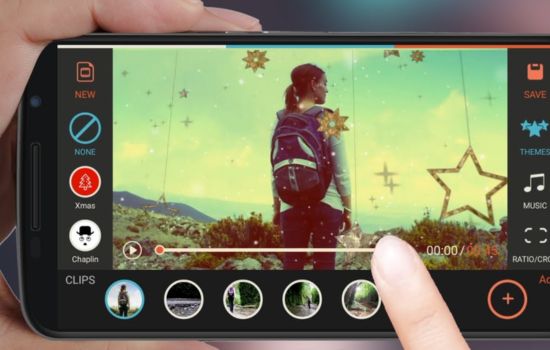
✨ The Future of Mobile Video Editing
The rapid evolution of mobile editing technology shows no signs of slowing. Artificial intelligence increasingly automates tedious tasks like color matching, audio synchronization, and even suggesting edit points based on content analysis.
Augmented reality features are becoming more sophisticated, enabling real-time effects and object manipulation that once required extensive post-processing. These capabilities open creative possibilities that blur lines between live streaming and edited content.
Cloud-based collaboration tools allow teams to work simultaneously on projects from different locations using mobile devices. This democratization of professional workflows empowers distributed creators to produce content rivaling traditional studio productions.
As mobile processors continue advancing, the distinction between desktop and mobile editing capabilities narrows. Today’s smartphones already handle 4K editing comfortably, and 8K processing is becoming viable. The question is no longer whether mobile devices can handle professional work, but why you’d choose anything else for many projects.
Video editing apps have transformed from novelty tools into legitimate professional platforms. Whether you’re creating content for personal enjoyment, building an online presence, or producing client work, modern mobile editors provide everything needed to bring your vision to life. The only remaining barrier is your imagination and willingness to explore these powerful creative tools.
