

Counting objects manually can be tedious and error-prone. Modern apps now use advanced image recognition technology to simplify this process dramatically.


Whether you’re managing inventory, organizing events, or working in construction, having a reliable tool to count items accurately saves time and reduces stress. Image-based counting apps leverage artificial intelligence and computer vision to identify and tally objects within seconds, transforming how professionals and individuals approach repetitive counting tasks.
These innovative applications have evolved significantly over recent years, offering features that go far beyond simple counting. They can recognize different object types, save counting templates, export data for analysis, and even work offline. Understanding how these apps function and which scenarios benefit most from their use can help you maximize productivity in your daily operations.
📱 How Image Recognition Counting Apps Work
Image-based counting applications utilize sophisticated algorithms that analyze photographs to detect and enumerate specific objects. When you capture an image, the app processes it through multiple layers of analysis, identifying patterns, shapes, and colors that distinguish individual items from their background.
The technology behind these apps typically involves convolutional neural networks (CNNs), a type of artificial intelligence specifically designed for visual recognition tasks. These networks have been trained on millions of images, enabling them to recognize common objects with remarkable accuracy even in challenging conditions like poor lighting or cluttered backgrounds.
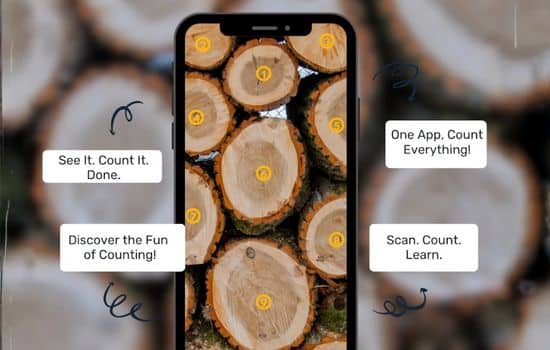
Most modern counting apps allow users to mark the first few objects manually, teaching the algorithm what to look for. This supervised approach significantly improves accuracy, especially when dealing with unusual items or specific counting requirements. The app then applies this learned pattern across the entire image, completing the count in seconds rather than minutes.
🎯 Industries Benefiting from Object Counting Technology
Numerous sectors have adopted image-based counting apps as essential productivity tools. Understanding where these applications provide the greatest value helps identify potential use cases you might not have considered.
Retail and Inventory Management 🏪
Retail businesses face constant inventory challenges. Counting stock manually consumes employee time and introduces human error. Counting apps enable staff to photograph shelves or storage areas and receive instant tallies, streamlining stocktaking processes and improving inventory accuracy. This technology proves particularly valuable during busy periods when rapid stock checks are essential.
Construction and Engineering 🏗️
Construction sites often require precise material counts—bricks, pipes, steel rods, or lumber. Manually counting these items is time-consuming and prone to mistakes. Apps that count objects through images allow project managers to verify deliveries quickly, track material usage throughout projects, and maintain accurate records for billing and planning purposes.
Agriculture and Farming 🌾
Agricultural professionals use counting apps to estimate crop yields, count seedlings in nurseries, or track livestock. Drone photography combined with counting algorithms can analyze vast fields, providing farmers with data-driven insights about plant density and distribution patterns that inform irrigation and fertilization strategies.
Healthcare and Laboratory Settings 🔬
Medical laboratories require precise counting of cells, colonies, or medical supplies. Image-based counting apps reduce the tedium of manual counting under microscopes while improving consistency and accuracy. Pharmaceutical inventory management also benefits from quick, reliable counting of medication packages and supplies.
Event Planning and Hospitality 🎉
Event organizers need accurate counts for seating arrangements, catering supplies, and decorative elements. Counting apps help coordinators quickly verify that orders match requirements, reducing last-minute surprises and ensuring seamless event execution.
✨ Key Features to Look For in Counting Apps
Not all counting applications offer the same capabilities. When selecting an app for your specific needs, consider these essential features that distinguish superior solutions from basic alternatives.
- Multiple object recognition: The ability to distinguish and count different item types within a single image expands versatility significantly.
- Custom templates: Saving counting configurations for repeated tasks eliminates setup time and maintains consistency across multiple counting sessions.
- Offline functionality: Apps that work without internet connectivity prove invaluable in remote locations or areas with poor network coverage.
- Data export options: The ability to export counts as CSV, Excel, or PDF files facilitates integration with existing business systems and reporting workflows.
- Adjustment tools: Manual correction features allow users to refine automated counts when necessary, combining AI efficiency with human oversight.
- Image enhancement: Built-in tools to adjust brightness, contrast, or crop images improve counting accuracy under suboptimal photography conditions.
- Cloud synchronization: Syncing data across devices enables team collaboration and ensures counting records remain accessible from anywhere.
- Historical tracking: Maintaining count histories over time reveals trends and patterns useful for forecasting and planning purposes.

📸 Best Practices for Accurate Counting Results
While counting apps deliver impressive results, following best practices when capturing images maximizes accuracy and minimizes the need for manual corrections.
Optimize Your Photography Technique
Good lighting makes tremendous difference in counting accuracy. Natural daylight or well-distributed artificial lighting reduces shadows that might obscure objects or create false positives. Position yourself directly above or perpendicular to the objects when possible, maintaining consistent distance and angle to avoid perspective distortion.
Ensure objects are clearly separated rather than overlapping. If items are stacked or clustered, consider rearranging them before photographing or taking multiple images from different angles. This simple preparation step dramatically improves recognition accuracy.
Use the Right Resolution
Higher resolution images contain more detail, enabling algorithms to distinguish individual objects more effectively. However, extremely large files may slow processing times. Most counting apps perform optimally with images between 2-8 megapixels—sufficient detail without excessive file sizes.
Maintain Consistent Backgrounds
Objects photographed against contrasting, uniform backgrounds are easiest for algorithms to identify. If possible, use a plain surface or backdrop that differs significantly in color and texture from the items being counted. This separation helps the app distinguish objects from their surroundings quickly and accurately.
Train the Algorithm Properly
When apps offer manual marking options, invest a few extra seconds in carefully indicating several example objects. This training phase teaches the algorithm exactly what you’re counting, especially important when objects vary slightly in appearance or when counting specific subsets within complex images.
💡 Creative Applications Beyond Traditional Counting
While most people use counting apps for straightforward inventory tasks, creative applications extend their utility into unexpected domains.
Educational Settings 📚
Teachers use counting apps to engage students in mathematics lessons, demonstrating concepts like grouping, estimation, and data collection. Students can photograph collections of classroom objects, compare manual counting against app results, and explore accuracy factors—turning a simple tool into an interactive learning experience.
Scientific Research 🔭
Researchers counting specimens, samples, or observational data benefit from the consistency and speed these apps provide. Whether studying insect populations, analyzing particle distributions, or documenting archaeological finds, image-based counting reduces researcher fatigue and improves data reliability across long studies.
Personal Organization 🏠
Home organizers and minimalists use counting apps to track possessions during decluttering projects. Photographing collections before and after organization provides visual documentation of progress and helps maintain awareness of accumulation patterns over time.
Quality Control Processes ✅
Manufacturing facilities implement counting apps as part of quality assurance protocols. Quick verification that product packages contain correct quantities of components or that assembly lines produce expected outputs helps identify production issues before they escalate into costly problems.
🔍 Comparing Manual Counting with App-Based Solutions
Understanding the advantages and limitations of each approach helps determine when technology provides genuine value versus situations where traditional methods remain preferable.
| Aspect | Manual Counting | App-Based Counting |
|---|---|---|
| Speed | Slow for large quantities | Near-instantaneous regardless of quantity |
| Accuracy | Prone to human error, fatigue | Consistent, can be verified and adjusted |
| Cost | Labor time expense | Small app cost, minimal time investment |
| Record Keeping | Requires separate documentation | Automatic digital records with timestamps |
| Flexibility | Works in any condition | Requires adequate lighting and photography |
| Learning Curve | None | Brief familiarization period |
The ideal approach often combines both methods—using apps for bulk counting where they excel while reserving manual verification for quality assurance or situations where image-based counting faces technical limitations.
🚀 Future Developments in Counting Technology
The evolution of artificial intelligence and mobile computing continues advancing counting app capabilities. Emerging trends suggest exciting possibilities for future iterations of this technology.
Enhanced AI Recognition
Next-generation algorithms will handle increasingly complex scenarios—counting objects in three-dimensional stacks, distinguishing similar items with subtle differences, or adapting automatically to new object types without manual training. Machine learning models grow more sophisticated with each update, expanding the range of countable items.
Augmented Reality Integration
Future apps may overlay count information directly onto live camera feeds using augmented reality, highlighting counted objects in real-time and providing instant visual feedback during the counting process. This immersive approach could further reduce errors and speed up verification tasks.
Multi-Modal Counting Systems
Combining image recognition with other sensors—RFID readers, weight scales, or barcode scanners—will create hybrid counting systems that verify results through multiple data sources. This redundancy improves accuracy in critical applications where counting errors carry significant consequences.
Collaborative Counting Networks
Cloud-connected apps may enable teams to collaborate on large counting projects, dividing tasks across multiple users while maintaining centralized data collection. Real-time synchronization would allow supervisors to monitor progress and accuracy across distributed workforces.
🎓 Getting Started with Your First Counting App
Beginning with object counting apps requires minimal investment but delivers immediate returns in time savings and accuracy improvements. Start by identifying your most time-consuming counting tasks—those repetitive activities that consume productive hours and cause fatigue.
Download a well-reviewed counting app and experiment with straightforward counting scenarios before tackling complex projects. Most apps offer tutorials or guided experiences that demonstrate core features. Practice with household items to understand how lighting, angles, and object arrangement affect results.
As you gain confidence, gradually introduce the app into your professional workflows. Begin with low-stakes counting tasks where minor inaccuracies carry limited consequences, allowing you to develop proficiency before depending on the technology for critical operations.
Monitor your results initially, comparing app counts against manual verification to build trust in the technology and identify situations where your specific use case requires technique adjustments. This validation period establishes baseline expectations and reveals optimal photography practices for your particular counting needs.
🌟 Maximizing Return on Investment
The true value of counting apps emerges not from occasional use but from consistent integration into routine operations. Calculate time currently spent on manual counting tasks, then project savings after implementing automated solutions.
Beyond direct time savings, consider secondary benefits: reduced counting fatigue improves employee satisfaction, accurate inventory data enables better purchasing decisions, and digital count records support analysis that reveals operational inefficiencies. These cumulative advantages often exceed the obvious productivity gains.
Train team members thoroughly on app usage, establishing standard procedures that ensure consistency across different users. When everyone follows the same photography techniques and verification protocols, organizational counting data maintains reliability regardless of who performs specific tasks.
Regularly review your counting workflows, identifying opportunities to expand app usage into additional areas. As comfort with the technology grows, previously overlooked applications become apparent, multiplying the initial investment’s value over time.
🔐 Privacy and Data Security Considerations
When selecting counting apps, particularly for business applications, evaluate privacy policies and data handling practices. Understand where counting data is stored, whether images remain on your device or upload to cloud servers, and how long records are retained.
Some industries face regulatory requirements regarding data handling. Healthcare facilities, for example, must ensure that any images potentially containing patient information comply with privacy regulations. Choose apps offering appropriate security features—encryption, access controls, and compliance certifications—that match your industry’s standards.
For sensitive business operations, consider apps offering offline-only modes that never transmit images or counting data externally. While this sacrifices cloud synchronization benefits, it ensures complete control over potentially confidential information about inventory levels, product designs, or operational capacities.
💬 Real-World Success Stories
Practical examples illustrate how diverse organizations have successfully implemented counting apps to solve specific challenges. A regional hardware store chain reduced inventory counting time by 60% after deploying image-based counting across locations, enabling more frequent stock checks without additional labor costs.
A botanical research institute studying plant populations in remote areas replaced manual field counting with app-based photography. Researchers captured images during brief field visits, then processed counts back at the laboratory, dramatically expanding the area they could survey within research budgets.
An event rental company eliminated delivery disputes by photographing and counting items during both drop-off and pickup. These timestamped, accurate records resolved customer disagreements about missing items while providing management with data about which inventory pieces required replacement or repair.
These success stories share common elements: clear identification of counting pain points, commitment to proper implementation, and willingness to adjust workflows around new technology capabilities. Organizations that approach counting apps strategically rather than as quick fixes consistently achieve superior results.
📊 Measuring Success and Continuous Improvement
After implementing counting apps, establish metrics to evaluate their impact objectively. Track time spent on counting activities before and after adoption, measure accuracy improvements through periodic manual verification, and survey users about satisfaction and ease of use.
These measurements serve dual purposes: demonstrating return on investment to stakeholders while identifying areas requiring technique refinement or additional training. Some users may discover photography approaches that deliver better results for specific items—sharing these insights across teams multiplies individual discoveries into organizational knowledge.
Technology evolves rapidly, with app developers continuously releasing updates that add features or improve recognition algorithms. Periodically review release notes and test new capabilities that might address previously identified limitations or open new use cases within your operations.
The journey from manual counting to automated image recognition represents more than adopting new software—it reflects broader digital transformation principles. Starting with counting apps often reveals additional opportunities where similar technologies could enhance efficiency, creating momentum toward comprehensive operational modernization.
By embracing these tools thoughtfully and strategically, you transform tedious counting tasks into streamlined processes that free human attention for higher-value activities requiring creativity, judgment, and interpersonal skills that technology cannot replicate.
